

Logo Net At Work

American Kennel Club Unleashes Efficiency

Since 1884, the American Kennel Club (AKC) has been a guiding force in canine advocacy. As the largest purebred dog registry in the world, the AKC is a trusted source of knowledge, inspiration, and support for dog lovers everywhere. The organization’s work touches countless lives, including hosting thousands of events annually and advancing groundbreaking research through the AKC Canine Health Foundation.

“Net at Work’s expertise has been a game-changer for us. They’ve helped us turn Sage X3 into the operational backbone we needed to manage our diverse business units effectively.”
Peter Rohslau, Controller, AKC

Behind the scenes, the AKC relies on a strong operational backbone to support its multifaceted organization, which includes six legal entities and a team of 500 employees. With business operations ranging from managing merchandise sales to sponsoring events and advocating for responsible dog ownership, the AKC needed a solution that could keep pace with its mission. For over a decade, Sage X3 and Net at Work have been vital partners in helping the AKC operate efficiently and fulfill its goals.

A challenge as big as the pack

The AKC’s operations are as diverse as the breeds it celebrates. Managing complex registrations, maintaining multiple eCommerce platforms, and ensuring smooth collaboration across departments and legal entities are no small tasks. The organization had relied on an older ERP application, but it simply couldn’t keep pace with the operation. The system wasn’t optimized for speed and performance, and data was siloed across various applications, making collaboration and decision-making more challenging.

Recognizing the need to align all aspects of the organization, the AKC partnered with Net at Work to conduct a full business process review and recommend a new, more robust ERP application. They selected Sage X3.

Fetching results with Sage X3 and Net at Work

With Net at Work’s help, the AKC unleashed Sage X3’s full potential, integrating diverse applications and workflows to create a single source of truth. AKC elected to host Sage X3 on the Cloud at Work Virtual Cloud, vastly simplifying maintenance and boosting accessibility. Today, eCommerce platforms, merchandise inventory, and data from their custom-built dog registration database flow seamlessly into the system. This streamlined approach replaced manual processes, saving time and improving accuracy across the organization.

Peter Rohslau, AKC’s controller, explains, “Net at Work’s expertise has been a game-changer for us. They’ve helped us turn Sage X3 into the operational backbone we needed to manage our diverse business units effectively.”

Staying out in front

With Sage X3 workflows, the AKC has automated key processes like purchase order approvals, transforming a once-paper-heavy system into an efficient digital operation. For an organization with over 50 departments, this centralization has been crucial for improving communication and reducing administrative bottlenecks.

The results speak for themselves. Department heads now receive timely, accurate reports every month—an improvement from the quarterly reports they relied on previously. This shift empowers the AKC to react faster to changing circumstances, whether reallocating resources or seizing new opportunities.

“Our ability to provide timely, actionable data has improved dramatically,” says Rohslau. “This allows us to stay ahead of challenges and support the strategic decisions that drive our mission forward.”

Growing the pack seamlessly

As the AKC has grown and added new legal entities, Sage X3 has made onboarding smooth and scalable. Even unique aspects of the AKC’s operations, such as their small-scale manufacturing process, are supported by Sage X3. With workflows configured by Net at Work, the AKC can manage production tasks efficiently, ensuring they stay on track without missing a beat.

Looking to the future, the AKC plans to implement additional tools, including workflow management and AP automation, further enhancing their ability to operate with agility and precision.

A top dog partnership

One of the AKC’s greatest strengths is its enduring partnership with Net at Work. For many years, the same consultant has supported the organization, ensuring continuity and a deep understanding of its needs. This consistency, backed by Net at Work’s deep bench of resources, has allowed the AKC to focus on its mission while confidently relying on its systems.

“Having the same partner, even the same consultant, makes all the difference,” Rohslau notes. “Net at Work understands how we’re built and ensures everything runs seamlessly. They’ve become an integral part of our success.”

Taking a walk into the future

The AKC’s mission impacts dogs, owners, and communities worldwide, from funding research that improves canine health to promoting responsible dog ownership. With Sage X3 as their operational backbone and Net at Work as a trusted partner, the AKC is poised to continue advancing its goals with efficiency and precision.

“Net at Work and Sage X3 give us the tools and support we need to keep moving forward,” Rohslau concludes. “With their help, we can focus on what matters to us—championing the bond between people and their dogs.”

Download the full Net at Work success story to read more about American Kennel Club’s journey to unleash Sage X3’s full potential.

Client Technical Xperience Plan (CTXP) for Sage X3

Stay Focused on Your Business. We’ll Handle System Performance

Ensure your system remains secure, stable, and optimized with Net at Work’s CTXP for Sage X3. Our proactive approach helps prevent issues before they arise, keeping your business running efficiently and securely.

Monthly Technical Reviews

Stay ahead of potential risks with a proactive assessment of your system’s health. Our monthly technical reviews provide:

  • Actionable Insights – A structured report outlining areas that require attention before the next review.
  • Completion Notification – An email confirmation detailing the process and next steps.

Quarterly Preventative Health Check

A comprehensive deep-dive into your system’s performance, security, and overall health to help ensure it continues to run efficiently.

  • Comprehensive Report – Insights from past reviews, performance metrics, and key findings.
  • Expert Recommendations – Tailored guidance on optimizations, security enhancements, and best practices.
  • Strategic Review Meeting – A dedicated session with our ERP specialists to discuss findings and align strategies with business goals.

Sage X3 License and SSL Certificate Update

We proactively manage your Sage X3 licenses and SSL certificates to maintain system functionality, security, and compliance. Helping to minimize disruptions and protecting your business from potential risks.

  • License Renewal & Validation – Acquisition and installation of Sage X3 license keys to ensure uninterrupted access.
  • SSL Certificate Renewal & Installation – Securing encrypted connections to protect sensitive data.
  • System Compatibility Check – Pre-update verification to prevent conflicts and ensure seamless transitions.
  • Testing & Validation – Post-update checks to confirm successful licensing and security configurations.
  • Completion Notification – A confirmation of updates performed.

Folder Refreshes

Maintain an accurate, up-to-date test environment with two folder refreshes included per year and more available upon request. This allows your team to safely test new configurations, troubleshoot issues, and validate changes before deployment. Thereby reducing risk and ensuring smooth upgrades.

  • Full Endpoint Replication – A secure and accurate copy of your production endpoint is transferred to the test environment, ensuring data integrity and consistency.
  • Environment Configuration – Adjustments to database connections, system parameters, and integrations to align with test environment requirements.
  • Validation & Integrity Checks – Post-copy verification to ensure data accuracy, proper system functionality, and alignment with expected configurations.
  • Completion Notification – A notification of refresh performed.

CTXP Features & Schedule

X3 Insider01

Proactive Maintenance. Expert Support. Total Peace of Mind.

With Net at Work’s CTXP for Sage X3, you benefit from ongoing system optimization, preventative maintenance, and expert guidance. Experiencing total peace of mind as a result.

Ready to Get Started?

Leave the complexity, security risks, and budget constraints of constant maintenance to Net at Work. Whether you’re looking to reduce costs or improve security, the CTXP Plan for Sage X3 is the obvious choice. Contact us today.

Extending Credit to Customers: Benefits, Risks & Best Practices

On the surface, extending credit to customers is a no-brainer since it can be a great way to attract customers and build profitable, long-term relationships with them. But there is more to it than that. Offering credit to a customer, especially a new customer, is not something to jump into in your haste to close a deal.

Here’s why:

  • DSO fluctuates with revenue and other short-term changes.
  • Because of its tendency to fluctuate, analyzing DSO over a period of less than a year can be misleading.
  • DSO takes into account only credit sales, not cash sales.
  • Always look at your DSO in context with your company’s terms.

As the above statistics show, there is a certain risk that you won’t get paid on time if you extend credit. This can cause trouble with cash flow and hinder your ability to meet the organization’s financial obligations. Before jumping into an agreement, consider the pros and cons of extending credit to customers.

Benefits of Extending Credit to Customers

While there are risks, there are several clear benefits to offering credit to your customers, including:

Establishing Trust with Customers

A company that offers credit is reliable, stable, trustworthy, and mature; all of which are comforts to a potential customer.

Increasing Customer Loyalty

Trusting your customers and offering them credit is a great way to tell them how important their business is to you and how much you appreciate it. They’re helping you bolster your business, so you are providing them with the option for credit so they can be flexible with their own cash flow without scrimping on what they need. By offering credit you have made them feel as though your relationship with them is less about supply and demand and more about trust, an essential part of the modern buyer’s vendor selection.

Enhance Your Company Reputation

Extending credit is not something every business can afford. By doing so, you’re telling customers and competitors that you’re financially healthy with cash and access to working capital. This will boost your organization’s reputation and your product among buyers and throughout your industry.

Gaining a Competitive Edge

Not all businesses extend credit, so just by making this a possibility for your customers you are giving yourself an edge. Customers like to buy on credit because it gives them more control over when they pay and gives them more flexibility and control over their cash flow. If they are between two vendors, they’re very likely to be more attracted to the vendor who gives them this flexibility.

Increasing Sales

For all of the reasons above, offering customers credit will help you attract more prospects and close more deals. Often times, customers are less concerned with the price when they know they can buy now and pay later. With longer payment terms and more buying power, your customers have everything they need to purchase more from you.

Additionally, the relationship you will establish with them in the process will further enhance their willingness to buy and even spread the word about your company to their peers.

Disadvantages of Extending Credit to Customers

All of these benefits of extending credit to customers seem attractive – and they are. But there are some risks to extending credit that all businesses should be aware of:

Late-paying Customers

Most of your customers who buy on credit will be great customers who pay you on time, but there could be a few rotten eggs that bring trouble in the form of late or delinquent payments.

Impact on Cash Flow

When you ask customers to pay upfront, you know exactly what your income is every month, but when you sell on credit, things get a little more complicated. As we mentioned above, most customers will pay you on time, some may be a little late, and some may become serious problems; all of this will affect cash flow, perhaps positively, but the chance for a negative impact is possible as well

Collection Fees

If you have to turn an invoice over to a collection agency or get a lawyer involved due to lack of payment, you won’t collect everything you’re owed. This combats the purpose of extending credit in the first place, but it’s only a real problem if numerous invoices require a collection agency or legal action. A well-written and regularly reviewed credit policy can help you avoid this issue entirely.

Focus on Accounts Receivable Management

If you start selling on credit, you will need to prioritize accounts receivable management. A/R management is much more than simply sending invoices and recording payments; it takes a lot of time and energy to do it right and avoid bad-debt write-offs, invoice disputes, and late fees.

You may even feel you need to hire another employee to keep up with it all. This is not always the case; you can implement plenty of tactics, tools, and simple process adjustments to help you quickly collect invoices without hiring additional hands or letting money slip through the cracks.

In Conclusion

Don’t run away scared from extending credit quite yet. While there are some significant disadvantages, there are simple ways to manage the risks of extending credit to your customers.

You can make smarter choices about credit sales by running credit checks, requiring new customers to fill out credit applications, developing a credit policy, and utilizing accounts receivable management best practices and tools to help make cash flow statements quick and effective.

Note: Content for this blog post was originally posted on Sage.com by Yassir Malik, June 3, 2025.

The Five Hallmarks of Modern ERP

Legacy ERP systems built in the 1990s served organizations well for decades. However, for many organizations, they may now represent a significant barrier to growth. Approximately 40% of business leaders identify legacy systems as a major obstacle to digital transformation. 

The numbers tell a stark story: on average, only 26-27% of employees actively use legacy ERP systems, falling far short of the ideal 50% engagement rate. Meanwhile, the total cost of ownership for legacy systems can be as much as five times higher than modern, cloud-based alternatives. 
It’s time for modern ERP: systems designed for agility, intelligence, and growth. 

What Makes an ERP System Modern? 

Modern ERP represents a fundamental reimagining of how enterprise software supports business operations. The global ERP software market reflects this transformation, with Fortune Business Insights projecting growth from $81.15 billion in 2024 to $229.79 billion by 2032, exhibiting a CAGR of 13.8%. Cloud-based deployments now represent 70.4% of all ERP implementations in 2024, up from 69.8% in 2023, with expectations to reach 75.9% by 2032. 

Today, 53% of business leaders consider ERP a priority investment. They’re not investing in legacy technology; they’re investing in five core capabilities that define modern ERP. 

The Five Hallmarks of Modern ERP 

1. Embedded Business Intelligence

Modern ERP transforms raw data into actionable insights across every department and location. This capability allows embedding intelligence directly into daily workflows so teams can make informed decisions in real time. 

“Rather than asking “What happened last quarter,” modern ERP asks, “What’s likely to happen next month and what should we do about it?”

The shift from descriptive to predictive analytics represents a fundamental change in how businesses operate. According to NetSuite’s analysis of ERP trends, more than 65% of organizations believe AI is critical to their ERP systems, with CIOs listing predictive analytics and deep learning as the most critical ERP technologies to gain a competitive advantage. Organizations implementing AI-enabled ERP systems have reported a 20% improvement in forecasting accuracy and a 15% reduction in operational costs. 

Rather than asking “What happened last quarter,” modern ERP asks, “What’s likely to happen next month and what should we do about it?” 

2. Intelligent Workflow Automation

Smart workflows eliminate manual touchpoints while keeping critical tasks on target. Modern ERP goes beyond digitizing existing processes and fundamentally redesigns them for efficiency. 

Organizations implementing modern ERP systems report an average 25% increase in operational efficiency. And according to NetSuite research, a survey found that adding AI to business processes led to dramatic improvements in ERP performance, with organizations experiencing significant efficiency gains in rule-based tasks and error reduction. 

This automation frees employees from repetitive administrative work, allowing them to focus on strategic initiatives that drive business growth. When systems handle routine tasks automatically, people can concentrate on the work that requires human judgment and creativity. 

3. Flexible Commerce Capabilities

Modern customers expect seamless experiences across all touchpoints. Modern ERP provides the tools businesses need to transact the way customers and partners prefer, whether through eCommerce, EDI, subscription models, or self-service portals. 

This flexibility extends beyond customer-facing transactions. Modern ERP supports various business models simultaneously: traditional sales, recurring revenue, usage-based pricing, and hybrid approaches. As market demands shift, businesses can adapt their commercial strategies without replacing their foundational systems. 

The integration capabilities of modern ERP enable data to flow seamlessly between commerce platforms, inventory systems, financial management, and customer relationship tools—creating the unified experience that today’s buyers demand. 

4. Composable Architecture and Platform Ecosystems

Perhaps the most transformative characteristic of modern ERP is composability, which is the ability to assemble software components as needed rather than accepting a rigid, one-size-fits-all solution. 

The market has embraced this approach decisively. According to a 2023 survey of IT decision-makers, 76% have heard of composable ERP, and 84% of those respondents planned to invest in composable ERP solutions. Research from Infosys indicates that 80% of CIOs surveyed list modular redesign through composability as a top-five reason for accelerated business performance. 

Composable ERP uses APIs and middleware to connect specialized applications into a cohesive system. Organizations can select best-of-breed solutions for specific functions such as accounting, inventory management, production planning, and integrate these functions seamlessly. When business needs change, companies can swap components without disrupting the entire system. 

This modularity, coupled with subscription-based pricing, lowers entry barriers and accelerates time-to-value, particularly for mid-sized businesses. Instead of massive upfront investments in monolithic systems, organizations can implement capabilities incrementally, demonstrating value at each stage. 

5. Global Financial Functionality at Scale

Modern ERP provides capabilities that support growth across borders. These capabilities include multi-company consolidation, multi-currency transactions, multi-book accounting, and sophisticated reporting that meets diverse regulatory requirements. 

According to Fortune Business Insights, North America accounted for approximately 35% of total ERP revenue in 2024, while the Asia-Pacific region is expanding at a CAGR of 13.2%, driven by digital transformation efforts. Organizations operating globally need systems that can manage this complexity without creating administrative bottlenecks. 

Modern ERP goes beyond tracking financial data by providing the visibility and control necessary to manage complex global operations while maintaining compliance with varying regional regulations, tax requirements, and reporting standards. 

The Business Case for Modernization 

The return on investment for modern ERP is compelling. According to NetSuite’s comprehensive analysis, the average ROI for ERP projects is 52%. Companies typically see returns within 2.5 years, and among organizations that performed ROI analysis prior to implementation, 83% reported that projects met their expectations. 

The operational benefits extend beyond financial returns. Among companies with at least one phase live for a year or longer, 91% reported optimized inventory levels, 78% reported improved productivity, and 62% reported reduced costs, particularly in purchasing and inventory control. 

The Competitive Reality 

The gap between legacy systems and modern ERP capabilities widens every quarter. Organizations that delay modernization don’t maintain the status quo—they fall further behind competitors who are leveraging modern capabilities to serve customers better, operate more efficiently, and adapt more quickly to market changes. 

As businesses drive toward $147.7 billion in global ERP spending in 2025, the question isn’t whether to modernize. The question is how quickly you can begin the journey toward a more agile, intelligent, and competitive future. 

Ready to explore modern ERP capabilities for your organization? Contact us to discuss how the five hallmarks of modern ERP can transform your operations. 

Sources 

  1. Acropolium. “How to Replace Your Legacy ERP System The Right Way.” https://acropolium.com/blog/legacy-erp-system/ 
  2. Fortune Business Insights. (2024). “Enterprise Resource Planning (ERP) Software Market Size, Share & Industry Analysis, By Enterprise Type, By Deployment, By Business Function, By End-user and Regional Forecast, 2025-2032.” https://www.fortunebusinessinsights.com/enterprise-resource-planning-erp-software-market-102498 
  3. Fortune Business Insights. (2024). “Cloud ERP Market Growth | Key Industry Developments [2032].” https://www.fortunebusinessinsights.com/cloud-erp-market-108617 
  4. Infosys. “Composable ERP – New Era of ERP.” Infosys Cobalt. https://blogs.infosys.com/infosys-cobalt/public-cloud/composable-erp-new-era-of-erp.html 
  5. LeverX. (2025). “ERP Trends 2025: What Businesses Should Pay Attention.” https://leverx.com/newsroom/erp-trends 
  6. NetSuite. (2024). “60 Critical ERP Statistics: Market Trends, Data and Analysis.” https://www.netsuite.com/portal/resource/articles/erp/erp-statistics.shtml 
  7. Research AIMultiple. “ERP Stats in 2025 from 20+ reputable sources.” https://research.aimultiple.com/erp-stats/ 
  8. SaaSworthy. (2025). “Top 50 ERP Statistics That Will Define 2025.” https://www.saasworthy.com/blog/top-erp-statistics 
  9. TechTarget. “9 ERP Trends for 2025 and Beyond.” https://www.techtarget.com/searcherp/feature/ERP-trends-for-this-year-and-beyond 
  10. Ultra Consultants. (2025). “Aging Legacy ERP Systems: 5 Things You Don’t Have in 2025.” https://ultraconsultants.com/erp-software-blog/five-things-you-dont-have-with-an-aging-erp-system/ 

MongoDB “MongoBleed” Vulnerability Mitigation for Sage X3

by Joe Harris, Sage X3 Technical Team Lead, Net at Work

A recently disclosed MongoDB vulnerability (CVE-2025-14847), informally known as “MongoBleed,” impacts nearly all Sage X3 environments. The issue involves a specific MongoDB compression method that may allow an unauthorized client to access memory, and it has been actively exploited in the wild. While the risk is reduced for deployments where MongoDB is protected behind an internal firewall, it is not fully eliminated.  

To address this vulnerability, MongoDB recommends using alternative compression protocols or disabling compression entirely as a workaround. Sage has released hotfix update editions of MongoDB for versions 4, 7, and 8, covering multiple patch levels of Sage X3 V12. For customers who choose not to apply the hotfix—or for earlier Sage X3 versions where no hotfix will be released—Sage recommends updating the MongoDB configuration to disable the affected compression method. Net at Work has tested and validated this mitigation when implemented using the procedures outlined below. 

Please note that applying this configuration change requires restarting both the Syracuse and MongoDB components of Sage X3. This work should only be performed during a planned maintenance window when all users are logged out of the system. 

Part 1: Changes to the mongodb.conf file 

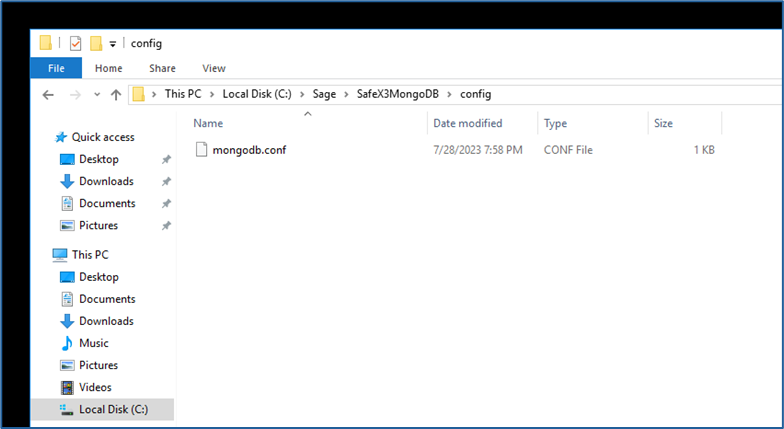
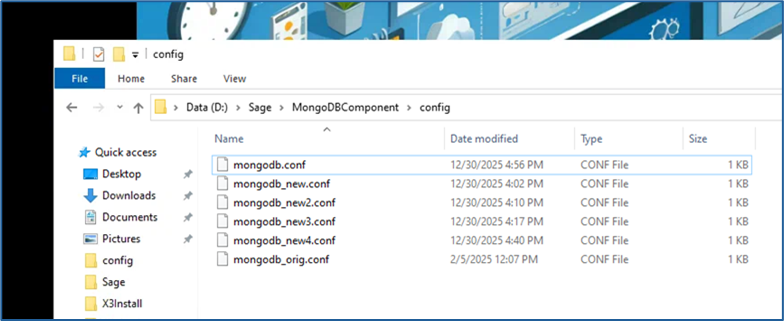
  1. Locate the file named “mongodb.conf” with your X3 instance’s MongoDB installation folder. It will be located in a subfolder named “config” 
    1. Example: Sage\MongoDBComponent\config 
    2. Different releases of the MongoDB component over the years have had different default naming conventions for the component folder. “MongoDBComponent” is the current standard and has been used consistently for the last several years and is the most common variant. If your X3 instance is older, your MongoDB folder may be named something like “MongoDB” or “SafeX3MongoDB” but it should still have a subfolder named “config” and a file named “mongodb.conf”.
      Mognobleed 1
  2.  Copy the file, naming the copy something like “mongodb_original.conf” to save as a backup in case you need to revert to the unmodified version
    Mognobleed 2

    1.  It is imperative that this backup be made before any alterations to the file take place. Any issue with the syntax and layout of the config file will cause MongoDB to not restart successfully. If you are unable to restart the MongoDB service and no solution to the issue can be found, rename this backup as “mongodb.conf” to bring the MongoDB service back online. 
  3. A successful update of this file will require an advanced text editor such as Notepad++. Sage and Net At Work recommend Notepad++ for its wide-ranging utility and typically install it on every X3 server as part of a standard deployment. If you do not have it installed on your MongoDB server, it can be downloaded for free from the publisher here. 
    1. Any other text editor that can display space, tab, and end of line symbols can be used instead if that is preferred, though the rest of these instructions assume use of Notepad++. It is NOT recommended to use standard Microsoft Notepad for this change, as it lacks functionality to validate space and tab formatting. 
  4. Open the “mongodb.conf” file in Notepad++ 
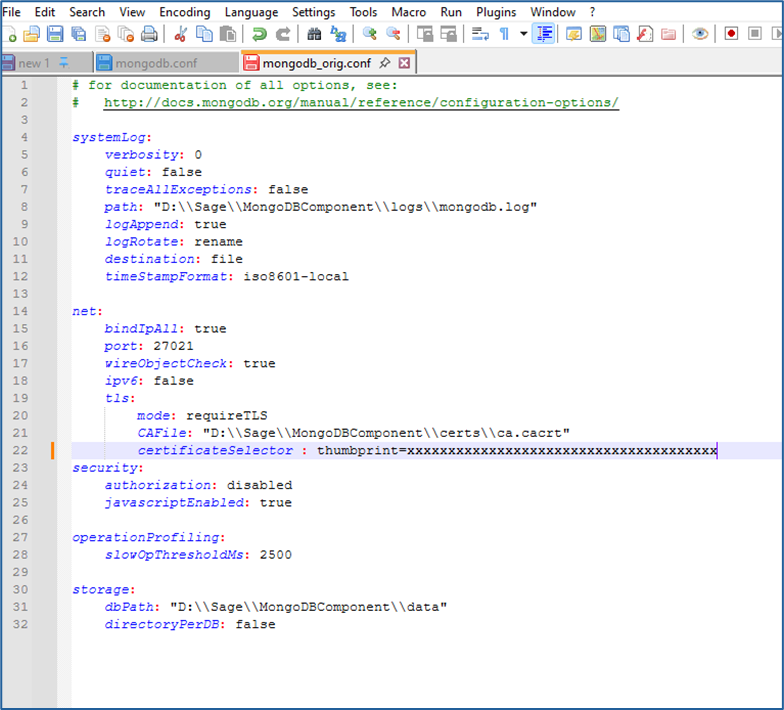
    1. It should look similar to this, with file paths and folder names specific to your instance:
      Mognobleed 3
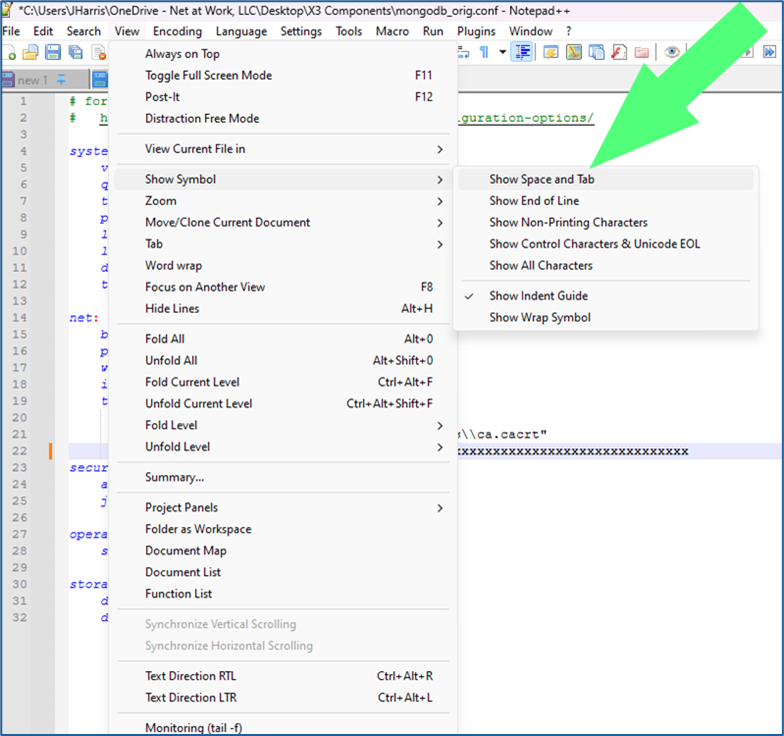
  5.  On the upper tool bar, select View – Show Symbol – Show Space and Tab and View – Show Symbol – Show End of Line
    Mognobleed 4
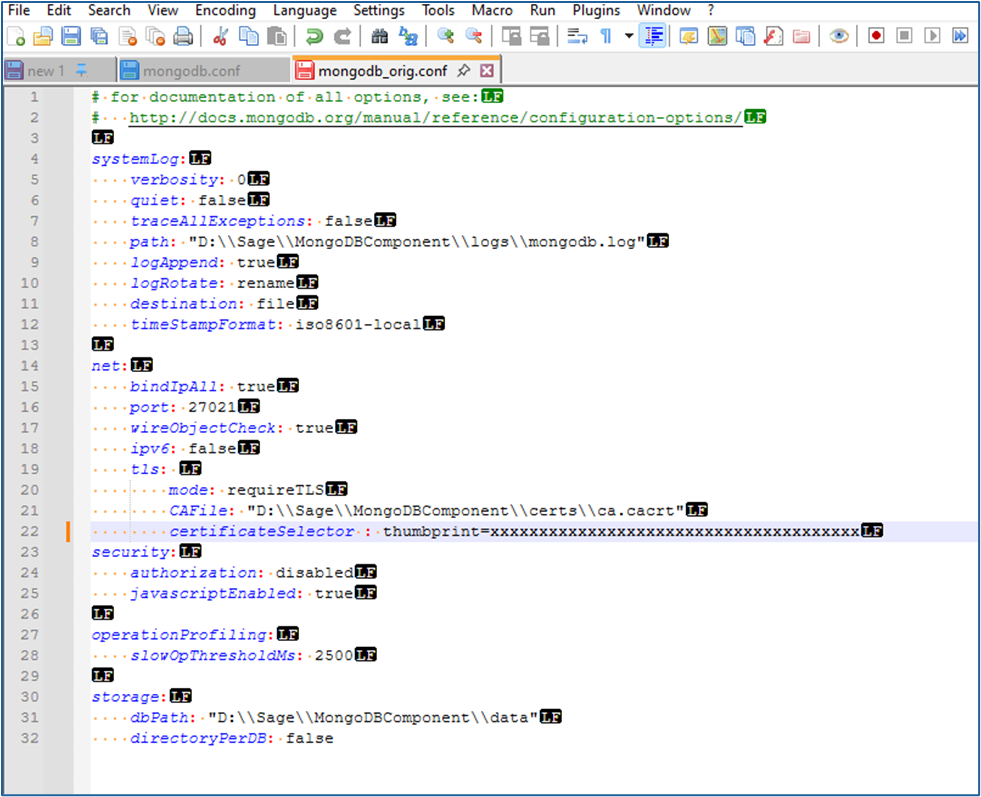
  6.  Once these two views have been selected, your file should appear like the following:
    Mognobleed 5

    1.  You should see yellow dots denoting spaces, and the “LF” symbol at the end of each line 
      1. Some older versions of Notepad++ only allow you to select one additional symbol view or the other. If your version only allows this, download and install the latest version of Notepad++ and use it. Both character views need to be seen simultaneously 
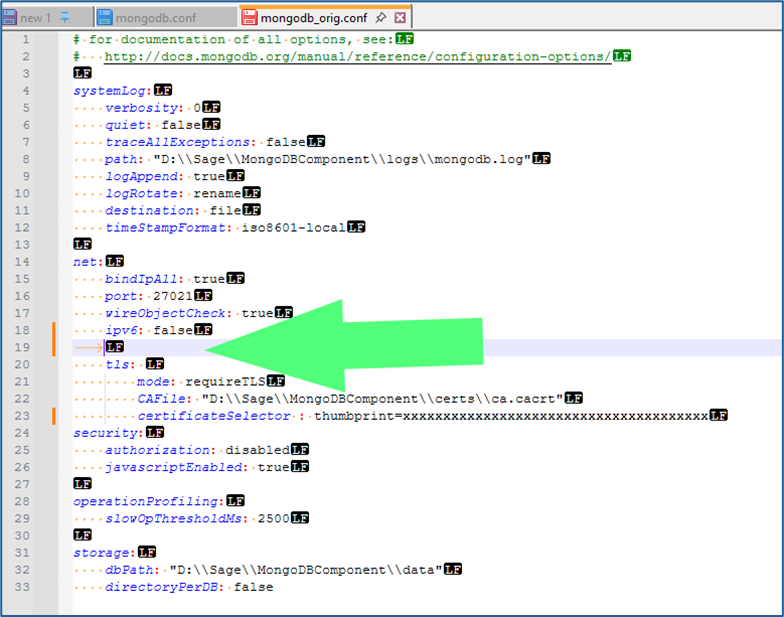
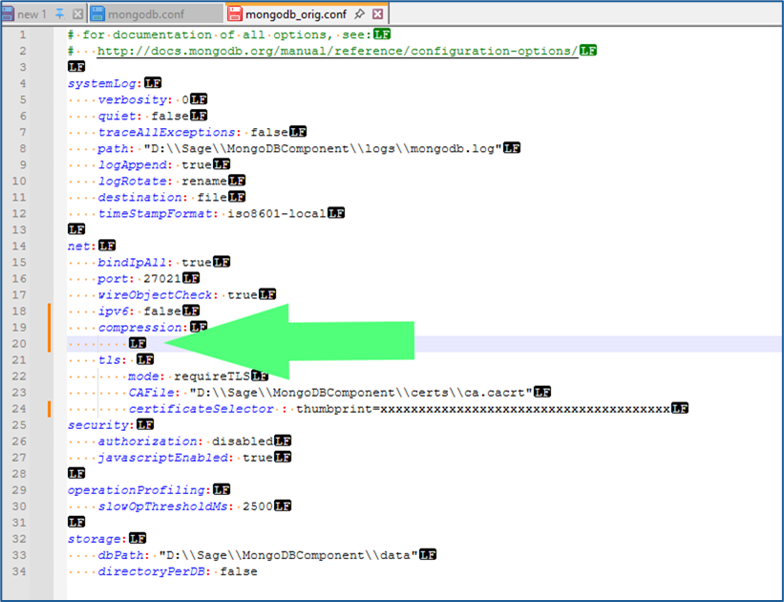
  7. Within the section of the file headed as “net:” and below the line containing “ipv6: false” and above the line containing “tls:” add an additional line.
    Mognobleed 6
     

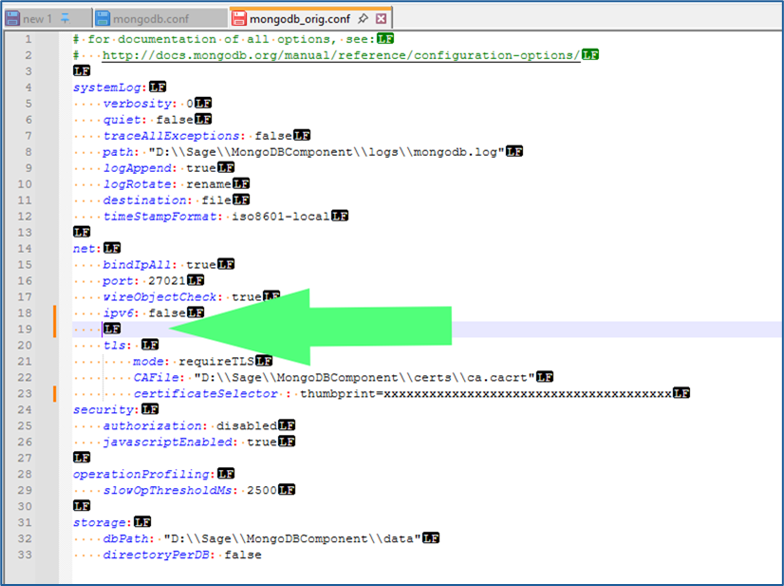
    1.  NOTE: The new line has been added with a TAB rather than spaces. That’s what the yellow arrow symbol in the screenshot above indicates. The tab now needs to be removed, and spaces added in its place:
      Mognobleed 7
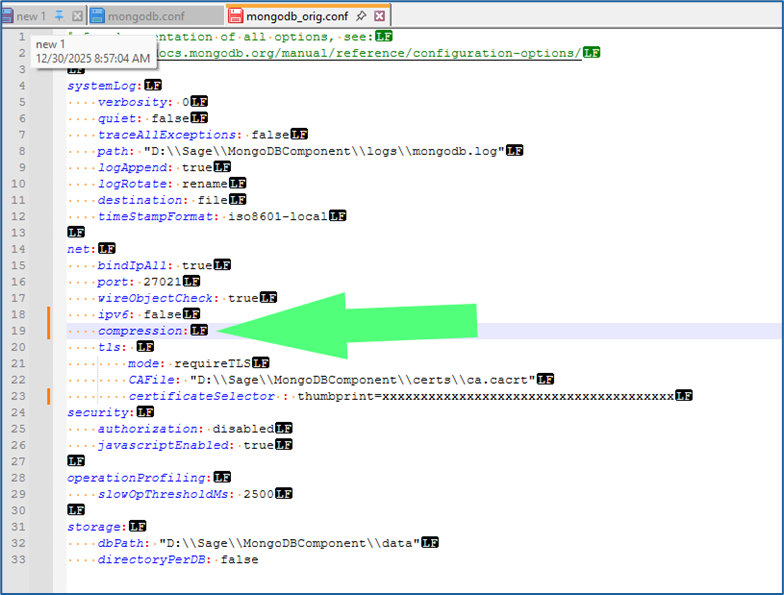
  8.  Add the following on this line, without the quotation marks, but with the colon: 
    1. “Compression:”  
      1. The beginning of this entry should align precisely with the lines above and below it:
        Mognobleed 8
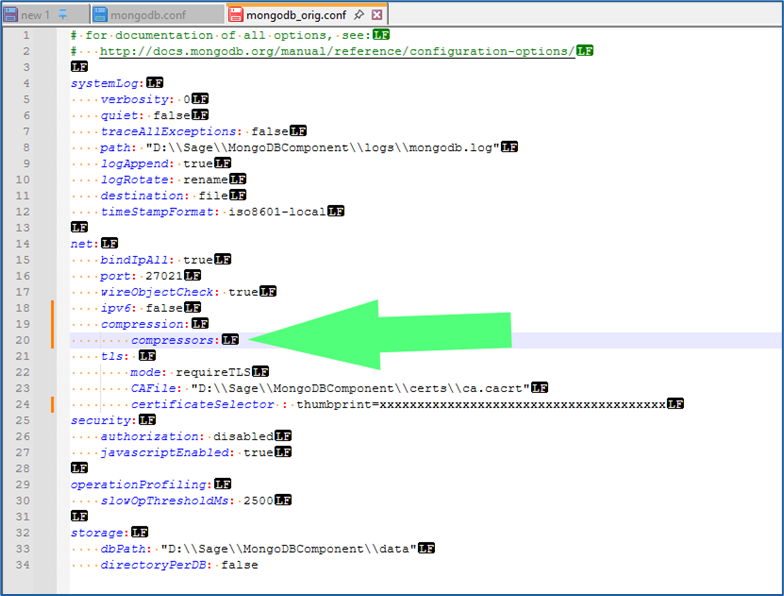
  9.  Add another line below “compression:” and above “tls:” 
    1. Repeat step 7 to remove the tab character and replace with spaces. This line should contain additional spaces so that it aligns with the lines below “tls:” such as “mode:” and “CAFile:”
      Mognobleed 9
  10.   Add the following text, without the quotation marks but including the colon 
    1. “Compressors:”
      Mognobleed 10
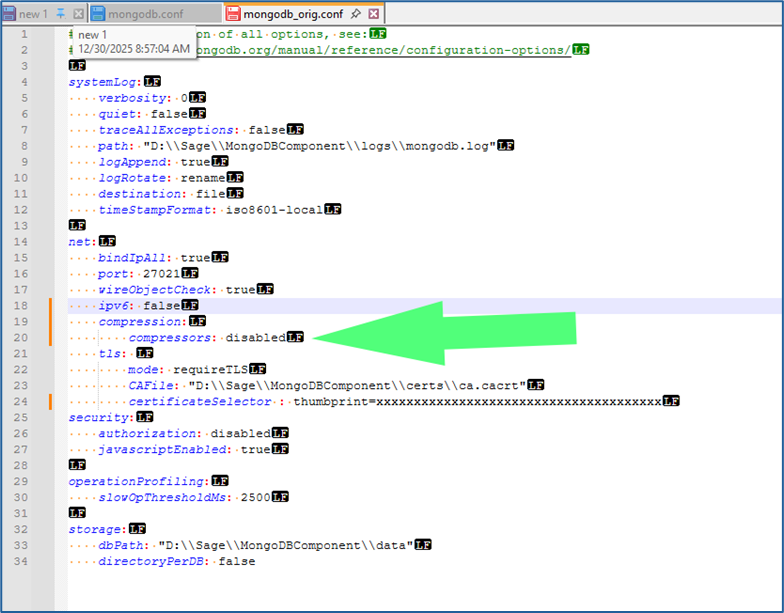
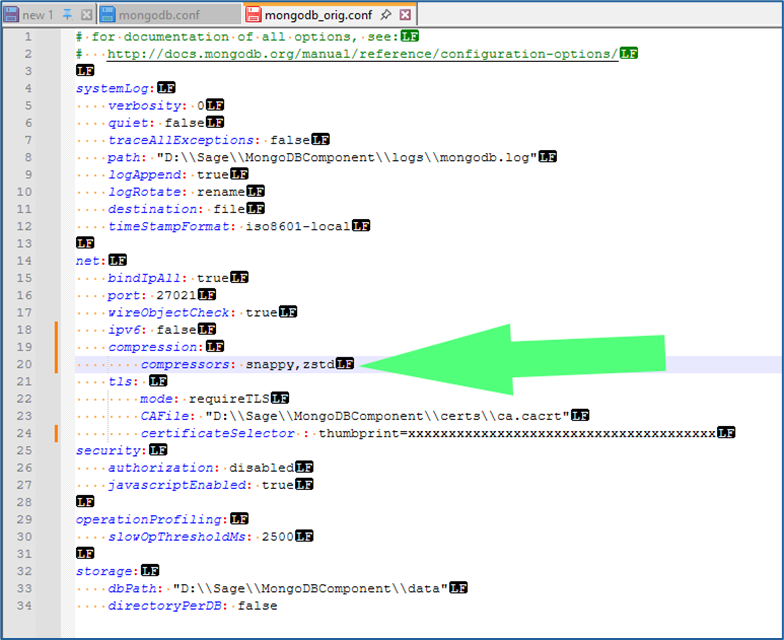
  11. Add the following text, depending on preference and situation, following “compressors:” and a single space (without quotation marks) 
    1. “Disabled” 
      1. Use this to disable all compression by MongoDB. This is Sage’s suggestion for all instances, and Net At Work’s recommendation if your MongoDB instance is on the same server as your Syracuse webhost component, and no other Syracuse webhosts are part of the solutionMognobleed 11
         
      2. “snappy,zstd” 
        1. Use this to allow MongoDB to continue to use the Snappy and ZSTD compression methods, while disabling the ZLIB compression method, which is the one affected by the security vulnerability 
        2. This allows MongoDB to continue using data compression, which it typically uses when communicating across the local network to remote Syracuse instances. Use this method if you wish to continue allowing MongoDB to use compression methods unaffected by the announced vulnerability 
      3. “snappy” 
        1. Some older versions of MongoDB and X3, such as X3 V11, do not include the ZSTD compression method and can only use the Snappy method. Use this and omit the “,zstd” if you are on X3 V11 or older and wish to continue to use data compression in MongoDB
          Mognobleed 12
  12.   Verify that the correct spacing, alignment, and line returns are in place so that it matches the example screenshots exactly. Misaligned spacing, incorrect positioning, or the presence of tabs instead of spaces will prevent MongoDB from running 
  13. Save the updated file 
    1. Note that the updated configuration will only go into effect once the MongoDB service has been restarted. It does not go into effect immediately. 

Part 2: Shutdown of X3 and Components

  1. The following procedure is for how to perform a clean shutdown of X3. This should be done prior to restarting MongoDB to pick up the modifications to the config file to mitigate the vulnerability. If you are already familiar with this process, you can skip to section three. 
  2. Log into X3 and access your Production folder. 
  3. Use the compass icon above to get to the X3 Menu 
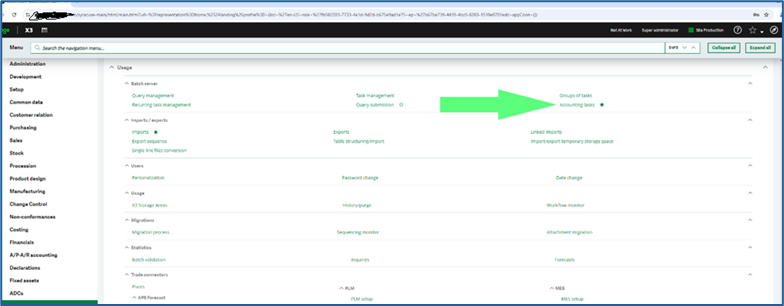
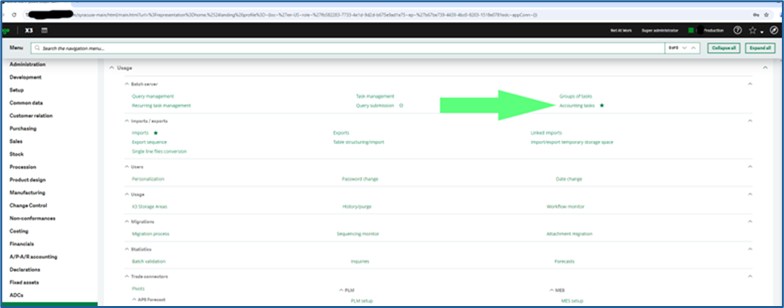
  4. Navigate to Usage>Batch Server > Accounting tasks
    Mognobleed 13
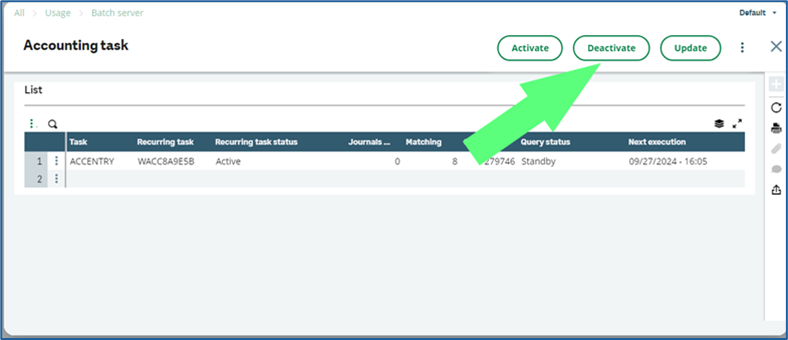
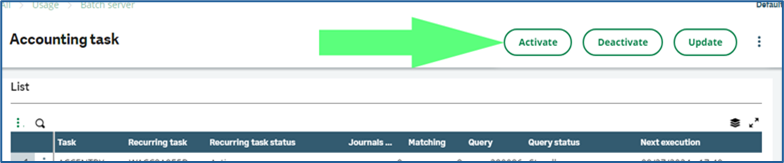
  5. Click the Deactivate button
    Mognobleed 14
     

    1.  Use “X”  the  button to back out of the Accounting task screen 
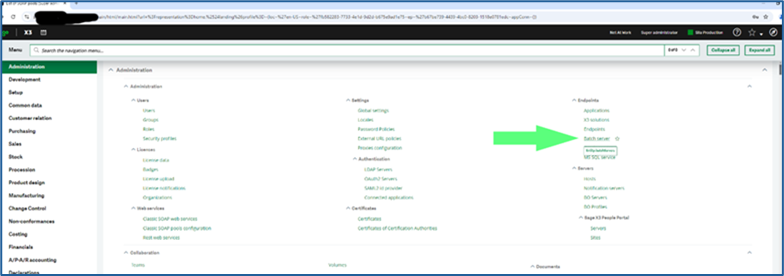
  6. Navigate to Administration > Endpoints > Batch server
    Mognobleed 15
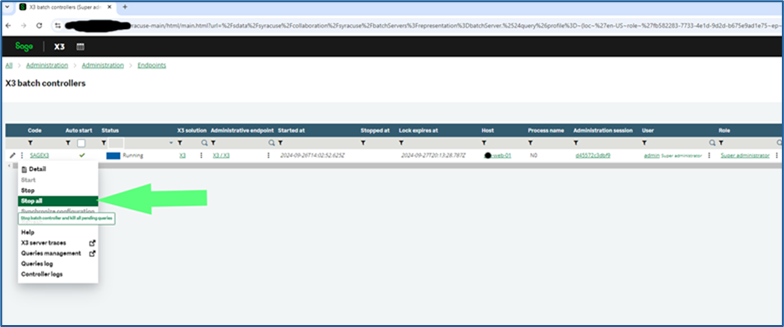
  7.  Click on the 3 vertical dots and select “Stop All” to stop the batch server
    Mognobleed 16
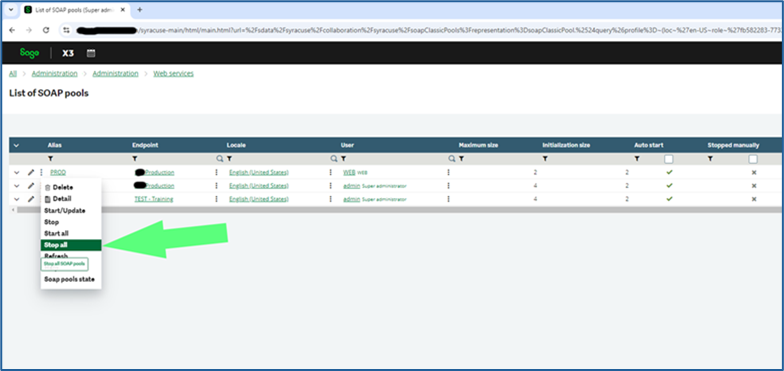
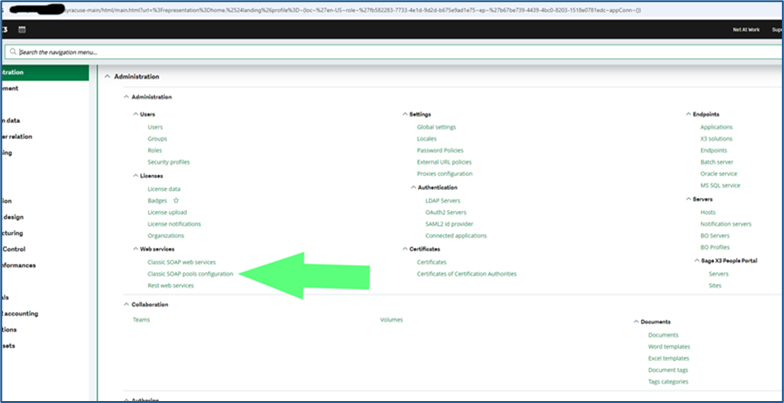
  8.  Stop WEB Pool Services
    Mognobleed 17
     

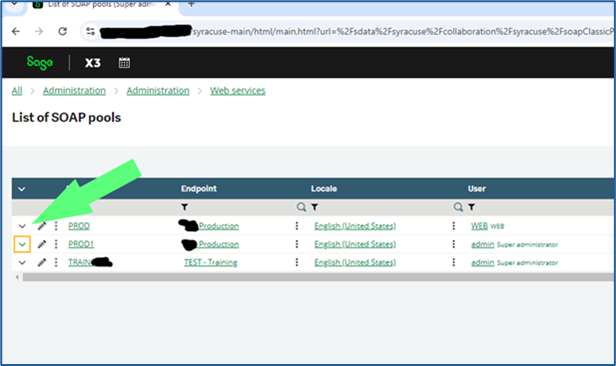
    1.  X3 -> Administration -> Administration -> Web services -> Classic SOAP pools Configuration 
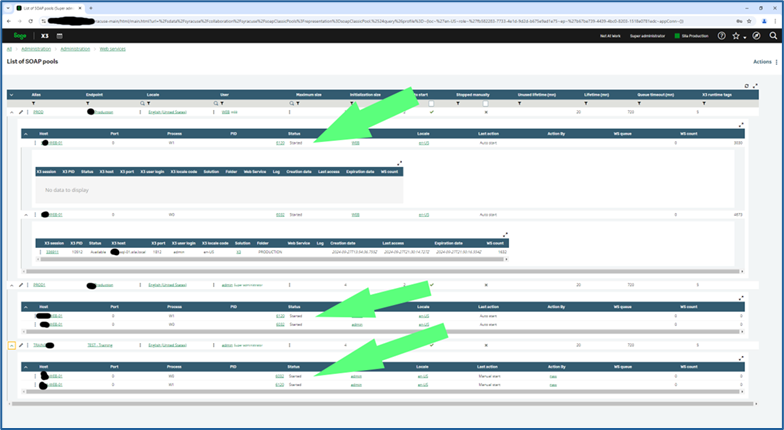
    2. Select the triple dots on each of the listed pools that have the \/ icon (indicating that they are running) next to Alias and click StopMognobleed 18
       

      1.  Click the Trashcan icon on each of the notification windows once each has confirmed stopped to clear the message from your screen. 
  9. Connect to the Windows desktop of your Syracuse server (or servers) 
  10. Open Services.msc 
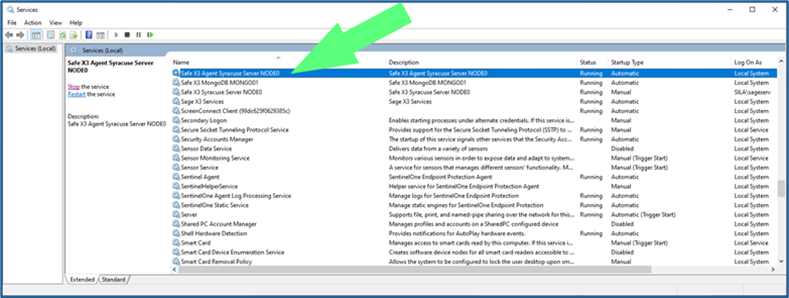
  11. Stop the Syracuse service 
    1. For versions of X3 prior to V12 P36, there are two services, one named “Safe X3 Agent Syracuse Server NODEx” and one named “Safe X3 Syracuse Server NODEx” 
      1. The “x” in the names above represent a number, usually 0 but sometimes 1, 2, 3, 4, etc.
        Mognobleed 19
    2.  Stop the service named “Safe X3 Agent Syracuse Server NODEx” 
    3. This service controls the “Safe X3 Syracuse Server NODEx” service as well – stopping the Agent service will also stop the NODEx service. 
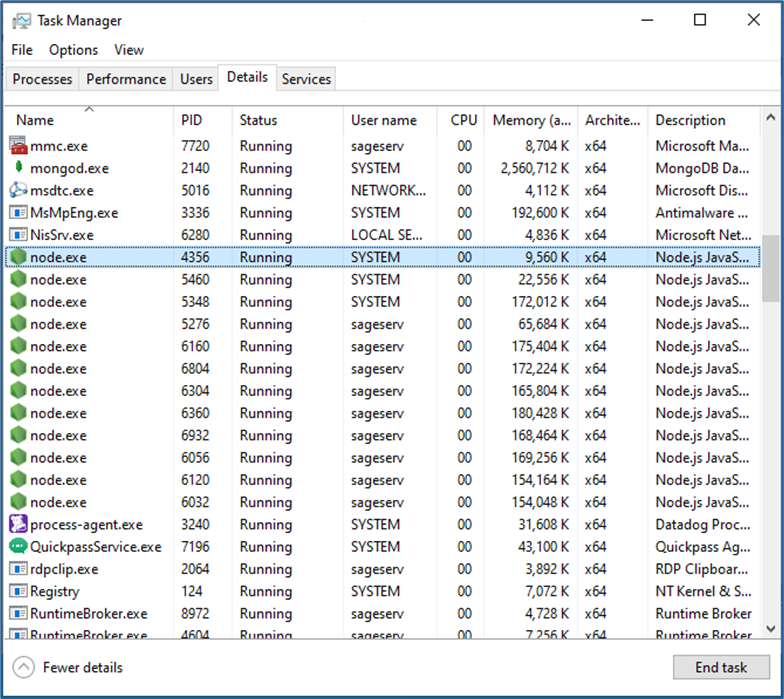
    4. If this service hangs up during the stop procedure, open Task Manager, go to the Details tab, select each instance of the “node.exe” process, and click End Task
      Mognobleed 20

      1.  ONLY perform step 2 above if the two Syracuse services do not successfully stop on their own 
    5. For versions of X3 after V12 P36, there is only one service named “Safe X3 Syracuse Server NODEx” 
      1. The same procedure as above can be performed while stopping only this service 
  12. If you have multiple Syracuse host instances in your X3 solution, repeat step 23 on all servers prior to proceeding with shutdown of MongoDB 
    1. If you also have a “Sage X3 Services” instance, stop this as well before proceeding 

Part 3: Stop and Restart of MongoDB Service

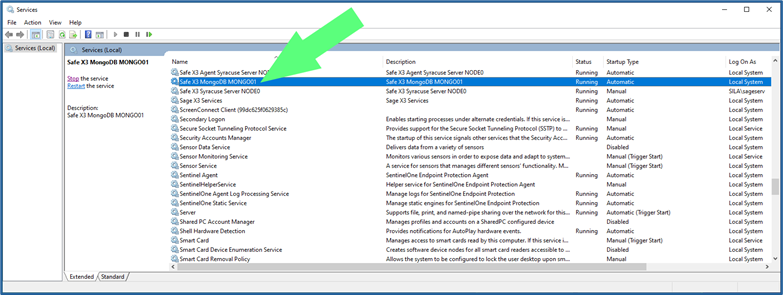
  1. Once all Syracuse and associated processes have been stopped on all servers, it is safe to restart MongoDB. 
    1. Stop the service named “Safe X3 MongoDB MONGOxx”
      Mognobleed 21
  2.  Start the Safe X3 MongoDB MONGOxx service 
    1. If you get an error when attempting to restart this service, it is likely that there is a configuration, layout, or bad character in your revised “mongodb.conf” file 
    2. Re-verify the changes made in section I above 
    3. If you are still unable to restart MongoDB, change the name of your revised “mongodb.conf” to something like “mongodb_new1.conf” and rename the backup copy created in step 1 as “mongodb.conf” 
      1. This will rollback the config change made and will not mitigate the vulnerability, but it will make X3 functional again. 
  3. Once the Safe X3 MongoDB MONGOxx service is running again, you can restart all Syracuse services on all servers 
    1. Also restart Sage X3 Services if present after all Syracuse services have been restarted 
  4. Once Syracuse has restarted successfully, log back into X3. 
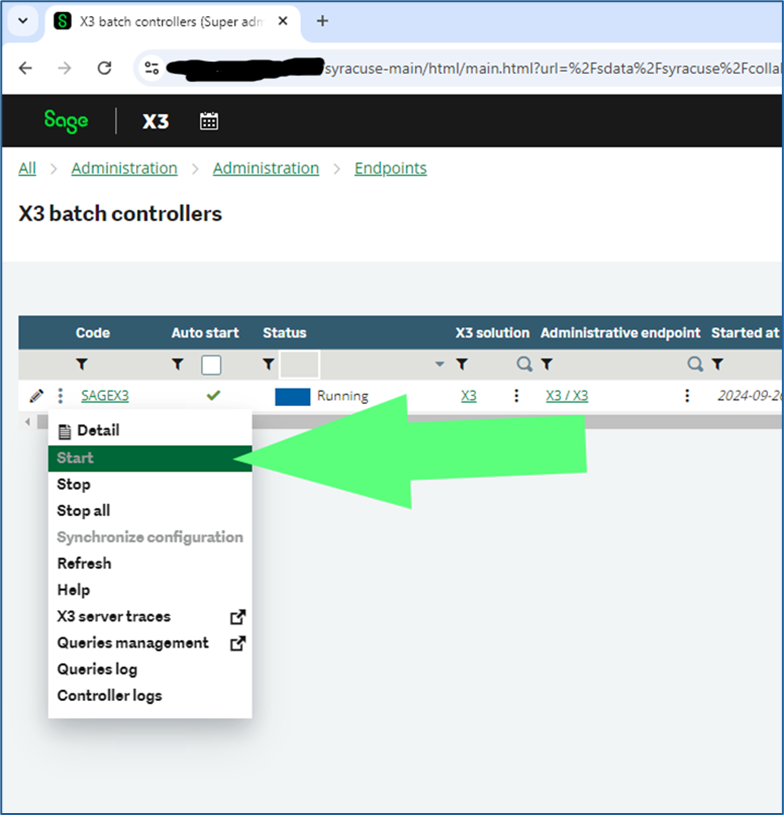
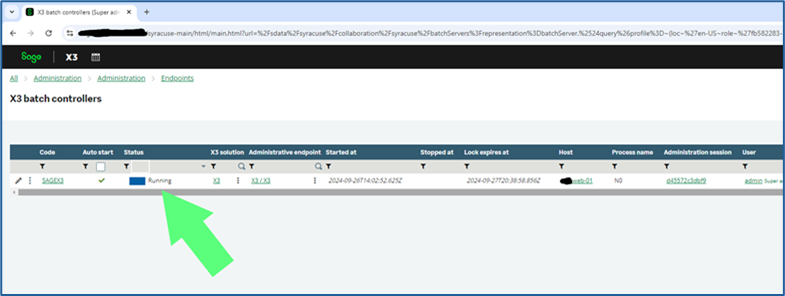
    1. Check that the batch server and all SOAP pools that are set on Auto Start have started running again. They are supposed to after a Syracuse restart. 
    2. If they did not, click the three dots as in section II above next to their names and click “Start”
      Mognobleed 25 Mognobleed 24 Mognobleed 23 Mognobleed 22
    3.  Go back into Usage > Batch Server > Accounting tasks  
    4. Click the Accounting task button
      Mognobleed 26
    5. Click the Activate button
      Mognobleed 27
    6.  Use “X” the  button to back out of the Accounting task screen 

Upon completion of these steps, your Sage X3 environment should be successfully mitigated against the MongoBleed vulnerability. If you encounter any issues, we recommend reviewing each step carefully to confirm configuration accuracy. Should you require assistance at any point, the Net at Work Sage X3 technical team is available to support you. 


Removing Physically Discarded Expired Lots from Inventory in Sage X3

To remove physically discarded expired lots in Sage X3 without changing dates, create a dedicated Miscellaneous Issue process (a new movement code, a product-category rule, lot-based output, a restricted entry transaction, and an access code) so the write-off stays controlled, traceable, and separate from routine inventory. 

Key Takeaways 

  • A standard Miscellaneous Issue usually blocks expired lots, so you need a configured exception to remove them. 
  • Build a dedicated Miscellaneous Issue setup: new movement code, product-category rule, lot-based output, restricted entry transaction, and an access code. 
  • This is an exception process — the better habit is managing lots before they expire using the recontrol function. 
  • Always test the setup in a non-production environment before using it on live data. 

Expired lot inventory can create a frustrating operational issue. In some cases, the product has already been physically destroyed or discarded, but the lot still appears on-hand in Sage X3. When the team tries to remove that stock through a standard Miscellaneous Issue, the transaction may be blocked because the lot is expired. 

That leaves the business with an important question: how do you remove an expired lot from inventory without changing the lot expiration date or the Miscellaneous Issue date? 

The answer is to configure a controlled process built specifically for expired-lot disposal. With the right setup, your team can remove physically discarded expired lots while keeping a clear record of what was removed and why.  

Key Configuration Steps 

When physical inventory and system inventory don’t match, the impact reaches well past the warehouse team. Expired stock that lingers in Sage X3 can distort inventory valuation, weaken your audit trail, and erode general confidence in your inventory data. 

The core issue is that the standard Miscellaneous Issue process isn’t designed to issue expired lots unless you configure it to allow that scenario. 

For clients managing lot-controlled products, this comes up often. Expired lots shouldn’t sit in the system after they’ve already been physically discarded. 

The Recommended Configuration Approach 

To support this process, create a dedicated Miscellaneous Issue setup for expired lots. This keeps the adjustment controlled, easy to trace, and separate from routine inventory movements. 

The configuration includes these key steps: 

  • Create a new movement code: Add a dedicated movement code in Miscellaneous Table 14 for expired-lot disposal. 
  • Assign the movement code in product category rules: In the product category Management Rules, create a new Miscellaneous Issue line and assign the new movement code. 
  • Allow lot-based output for this transaction: Set the Output Lot field to “Yes” and set the other fields in that setup to “No.” 
  • Create a dedicated Miscellaneous Issue entry transaction: Build a new Miscellaneous Issue entry transaction specifically for this expired-lot removal process. 
  • Link the movement code to the entry transaction: Assign the new movement code to the new Miscellaneous Issue entry transaction. 
  • Restrict access: Add an access code so only authorized users can run this transaction. 

Once you’ve completed these steps, your organization will have a clean way to remove expired lots that have already been physically discarded, while keeping the process controlled and auditable. 

Best Practice Guidance 

This configuration should be used as an exception process, not as the primary way to manage expiring inventory. 

The better habit is to manage lots before they expire. In Sage X3, that means using the recontrol function to review inventory ahead of the expiration date and decide what action to take. If a lot expires before that review happens, another good practice is to move it into quarantine or rejected status. 

Some teams ask whether inventory count functions can be used to remove the stock instead. That may work in certain cases, but it isn’t the preferred approach here. A dedicated movement code and a restricted Miscellaneous Issue transaction give you better control, a cleaner record, and clearer process boundaries. 

Business Value 

With this configuration in place, organizations can: 

  • Keep Sage X3 inventory matched to physical inventory. 
  • Remove expired lots after physical disposal, without backdating. 
  • Improve inventory valuation accuracy and keep audit trails clean. 
  • Limit the entire process to authorized users. 

Frequently Asked Questions 

Why won’t Sage X3 let me issue an expired lot? 

By default, the standard Miscellaneous Issue process isn’t set up to issue expired lots. You must configure a dedicated movement code and entry transaction that explicitly allows expired-lot output before the system will let the write-off through. 

How do I remove a discarded expired lot without changing the expiration or transaction date? 

Create a separate, restricted Miscellaneous Issue process specifically for expired-lot disposal. Because it uses its own movement code with lot-based output enabled, you can remove the stock while leaving the lot expiration date and the transaction date untouched. 

Can I use an inventory count to remove expired lots instead? 

You can in some cases, but it isn’t the recommended approach. A dedicated movement code and a restricted Miscellaneous Issue transaction give you tighter control, a clearer record of the disposal, and better separation from routine inventory activity. 

Final Takeaway 

Expired lots shouldn’t remain in Sage X3 after they’ve been physically discarded. By configuring a dedicated movement code and Miscellaneous Issue entry transaction, your team can handle these expired-lot write-offs in a controlled and traceable way. 

Before making changes, test the setup in a non-production environment and confirm the process fits your company’s inventory control policies. 

If you get stuck during configuration or you’d like a second set of eyes on your expired-lot process, contact Net at Work’s Sage X3 team. We can review your current setup and help determine the right configuration for your business.

Custom Tax Rule to Override AvaTax Calculations for Product Exemption

When you need to exempt specific products from sales tax for a non-exempt customer in a jurisdiction where you collect taxes, this guide will help you create a custom tax rule in AvaTax.

For example, in the invoice below, a service (New Basic Seminar) should be exempt from sales tax, while the other products remain taxable. Here’s how to configure this rule in AvaTax:

Custom Tax Rule to Override AvaTax Calculations

Steps to Create a Custom Tax Rule

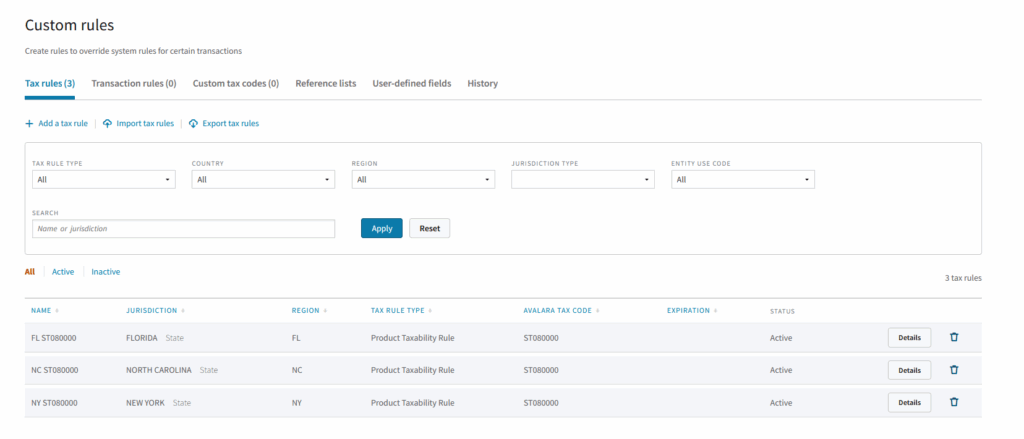
  1. Access Custom Rules Page
  • From the Avalara Portalpage, go to Settings > All settings.
  • Under the Custom Rules tile, click Manage to open the Custom Rules page.
  • Go to the Tax Rules tab and click Add a Tax Rule to open the New Custom Rule page.
  1. Enter rule information on the new custom rule page
  • Name: Provide a clear and descriptive name for the rule.
  • Effective & Expiration Dates: Specify when the rule should start and end (if applicable).
  • Rule Type: In this field, you need to choose the custom rule that you want to apply. For this example, we’re going to select the “Product Taxability Rule”, which determines whether an item is taxed in a specific jurisdiction.
  • Location: Each custom tax rule applies to a single location. Create separate rules for each location if needed.
    Custom Tax Rule to Override AvaTax CalculationsCustom Tax Rule to Override AvaTax Calculations


  1. Define the Taxability Rule

Begin by choosing whether this rule makes the item taxable or nontaxable.

If it’s taxable, you then need to specify whether the rule includes special handling and designate either a cap or threshold value.

  • Cap Option: Set a tax cap and choose how to apply it:
    • Cap the taxable amount at the document level.
    • Limit the tax on the line to the cap amount.
    • Exempt the entire amount after the cap is met.
  • Threshold Option: Set a threshold amount and define its application:
    • Tax the entire amount once the threshold is met.
  1. Specify the Jurisdiction & Tax Rate Basis
  • Choose the jurisdiction where the rule applies.
  • Select how the tax rate should be determined:
    • Ship-from address (origin)
    • Ship-to address (destination)
    • Use system sourcing (AvaTax decides automatically)

    Custom Tax Rule to Override AvaTax Calculations


Finalizing & Applying the Rule

  • Remember to create a rule for each jurisdiction that you want it applied.
    Custom Tax Rule to Override AvaTax Calculations
  • Your new custom tax rule will now apply to transactions moving forward.
  • To apply it to past transactions, re-save sales data or recalculate tax.
    Custom Tax Rule to Override AvaTax Calculations

Out of the Box and Into Greater Efficiency—Fabuwood Scales Smartly with Net at Work and Acumatica

Fabuwood has built its reputation on delivering high-quality, stylish cabinetry at unmatched speed. As one of the industry’s most innovative manufacturers, the company blends mass production with customization, offering dealers a vast selection of designs with tailored modifications—all without the long lead times of fully custom cabinetry.

To maintain its fast-paced, tech-driven business model, Fabuwood needed an ERP system that could keep up with its ambitious growth. Managing thousands of orders, tracking custom modifications, and ensuring seamless inventory management required a system built for scalability. That’s why Fabuwood turned to Acumatica and Net at Work, a trusted partner with the expertise to unlock the ERP’s full potential.
A System Designed for Growth

Before Acumatica, Fabuwood relied on multiple disconnected systems, making it difficult to scale efficiently. QuickBooks couldn’t handle the volume, and the lack of manufacturing and inventory capabilities created inefficiencies. Moving to Acumatica allowed Fabuwood to integrate order processing, inventory management, and production into a single, cohesive system.

“Net at Work has been there for us every step of the way. We’re confident that as our business evolves, we have the right technology and the right team behind us to keep pushing forward.”

Shlomo Friedman, ERP Project Manager, Fabuwood

Net at Work played a critical role in optimizing the implementation, ensuring that Acumatica was configured to support Fabuwood’s semi-custom manufacturing model. “Our business depends on precision and speed,” says Shlomo Friedman, ERP Project Manager at Fabuwood. “With Acumatica, we can track orders in real-time, streamline workflows, and ensure everything moves smoothly—from the moment an order is placed to the final delivery.”

Smarter Supply Chain, Faster Turnarounds

With materials coming from multiple vendors and a high volume of orders constantly moving through production, visibility into the supply chain is crucial. Acumatica’s robust forecasting capabilities now allow Fabuwood to optimize purchasing and reduce excess stock while ensuring materials are available exactly when needed.

“Our business thrives on fast lead times,” Friedman explains. “If we don’t have the right materials on hand, we can’t meet our delivery promises. Acumatica gives us the real-time insights we need to make better decisions and keep production on track.”

The Right Technology, The Right Partner

While Acumatica’s flexibility is key to Fabuwood’s success, having the right partner makes all the difference. Net at Work helped the company configure workflows that balanced out-of-the-box efficiency with necessary customizations, ensuring the system worked for their unique operations.

“You shouldn’t have to customize everything,” Friedman notes. “Most of what we needed was already there. But where we do need adjustments, Net at Work makes it easy to tailor the system to our needs.”

As Fabuwood continues to expand, the company now has a strong, scalable foundation to support its future growth. Whether optimizing order management, improving inventory control, or integrating new technologies, Acumatica and Net at Work provide the tools and expertise to keep Fabuwood ahead of the curve.

“Net at Work is there for us every step of the way,” Friedman says. “We’re confident that as our business evolves, we have the right technology and the right team behind us to keep pushing forward.”

Download the full Net at Work success story to read more about Fabuwood’s pathway to operational excellence.

Cloud vs. On-Premise ERP: How to Choose the Right Deployment Model

Choose the ERP system and implementation partner that fit your operations first, then let those requirements determine whether cloud, on-premise, or hybrid makes sense. For most mid-market businesses, that process points to cloud, but only after business fit, compliance, connectivity, and customization needs are clear.

Key Takeaways

  • The cloud-vs-on-premise question is the wrong place to start. An important deployment decision should follow your system selection and your business requirements, rather than the other way around.
  • There are three options: cloud (vendor-hosted, subscription), on-premise (you own the servers and the software), and hybrid (a mix, such as cloud financials with on-premise operations).
  • On-premise still makes sense for some businesses such as heavily regulated industries, strict data-residency rules, limited site connectivity, or deep, business-specific customization.
  • Cloud is the stronger fit for most mid-market companies: lean IT teams, predictable operating costs, multi-site and mobile users, and security and updates handled by the vendor.
  • The single biggest predictor of success isn’t where the software runs. Pick the partner before you pick the platform.

The real risk in choosing where your ERP is hosted is choosing how to deploy before you’ve figured out which system fits how your business runs, and who’s going to stand it up. With the right technology partner, cloud versus on-premise deployment becomes a straightforward technical call.

Why “cloud vs. on-premise” is the wrong first question
Deployment model is a “how.” Fit is a “what.” Start with the “what” and the “how” tends to answer itself. For example, a mid-market distributor with three warehouses, a four-person IT team, and a board asking for real-time margin reporting has, in effect, already chosen cloud; they just haven’t named it yet. A defense subcontractor bound by data-residency requirements has been pointed toward on-premise or a private environment before anyone opens a deployment brochure.


The three ERP deployment models

Cloud ERP runs on the vendor’s infrastructure and reaches you over the internet. You subscribe rather than buy, the vendor handles hosting, updates, and most security, and your team logs in from anywhere. Costs are predictable and operational rather than a large upfront purchase.

On-premise ERP is the traditional model: you license the software, run it on servers you own and maintain, and take responsibility for backups, patches, and security. It’s a bigger capital commitment and a heavier internal IT load in exchange for total control over the environment.

Sitting between them is hybrid, where some functions live in the cloud and others stay on-premise. It isn’t a compromise so much as a deliberate design choice for businesses whose requirements genuinely differ across departments.

When on-premise still makes sense

Cloud doesn’t win every time. On-premise is the right answer when regulation or data residency requires it. Some defense, government, and healthcare-adjacent contracts mandate that data stay within specific physical or jurisdictional boundaries that a public cloud can’t always satisfy.

It’s also the right call when connectivity is unreliable: a plant or remote site with spotty internet can’t depend on a system that lives entirely online, and local infrastructure keeps operations running when the connection doesn’t. And when customization runs deep, businesses with heavily tailored, business-specific processes sometimes find that control over the full stack matters more than the convenience of a managed platform.

When cloud is the stronger fit

For most SMBs, the requirements lean cloud.

  • The fit is strong when you have a lean IT.
  • Cloud ERP is usually best when you want predictable cost, because subscription pricing turns a large capital purchase into a steady operating expense you can plan around.
  • It fits multi-site or mobile teams, where distributed warehouses, field service techs, and remote staff all work from one live system.
  • Cloud ERP is preferable when you need better security, since vendor-managed environments bring encryption, identity management, threat monitoring, and automatic updates.
Promo Banner Outdated Systems Warning List

When hybrid ERP makes sense

Many SMBs don’t land cleanly on either side. A common pattern is financials and reporting in the cloud, where real-time visibility and remote access pay off most, and with manufacturing or inventory functions kept on-premise to preserve speed and control on the shop floor.

Hybrid systems also support a phased migration, where organizations move the business to cloud one workstream at a time instead of betting everything on a single cutover.

The decision that matters most is your technology partner

Where your ERP runs is a technical detail. Your technology implementation partner makes the difference between a system that pays for itself and an expensive disappointment. A capable implementer doesn’t just install software; they map your processes, manage the change, and steer the project away from common pitfalls.

If your last ERP project went over budget, past deadline, or never fully adopted, that experience is the reason to bring in a partner with a formal recovery practice, not the reason to give up on modernizing. A failed first attempt isn’t the end of the road; it’s a problem with a named solution.

How Midway Industrial Supply chose the right fit

Midway Industrial Supply, the Mid-Atlantic region’s largest independent distributor of power transmission products and industrial supplies, was dealing with an on-premise ERP system that was nearly 30 years old and had performance issues that drained productivity. The company began its search for a modern ERP with what the business needed: better insight across the organization and a system that was easy to roll out to newly acquired entities.

Working with its long-time technology partner Net at Work, with hosting delivered through the Cloud at Work private cloud, Midway replaced its aging system with Acumatica Cloud ERP. The result was:

  • 25% efficiency gains across teams and departments
  • Automated workflows that cut staff touchpoints and sped up time to payment
  • Despite three acquisitions and three new locations, the company needed to add only one new finance employee

Cloud was the right deployment because it served Midway’s business requirements.

Map your requirements first

Before you weigh cloud against on-premise, define what your business needs the system to do and find the partner who can deliver it.

Schedule a consultation and we’ll start where the decision really begins: with your organization’s requirements.