Logo Net At Work

Identity Attacks Are the New Cyber Threat: Why Zero Trust Matters for SMBs

Over 600 million identity attacks occur daily, with more than 99% targeting passwords through breach replay, password spray, and phishing tactics, according to the 2024 Microsoft Digital Defense Report. Yet despite this staggering reality, most organizations remain focused on traditional perimeter defenses while attackers simply log in with stolen credentials.  

“The most common misconception is that there is one product or one solution to buy and you are protected,” says Brian Kingsley, Director of Managed Services at Net at Work. “Many leaders think of security as a point in time protection—I bought this and thus I’m good. But this is an ongoing, living and breathing concept that requires constant attention and evaluation, much like a business needs to continually update its forecast and budget.”  

Breaches do not start with hackers smashing through firewalls anymore; they start with logins that look completely legitimate. This is what makes identity attacks so dangerous, so common, and so difficult to detect. 

In this article, you will learn:

  • Why identity attacks have become the primary threat vector for modern breaches 
  • How small and mid-sized businesses have become prime targets for cybercriminals 
  • Why traditional MSP security models are no longer sufficient 
  • What Zero Trust really means for SMBs (without enterprise complexity) 
  • Practical steps you can take now to improve your organization’s security posture 

What Is an Identity Attack? 

Identity attacks do not break in; they blend in. Unlike traditional cyberattacks that exploit network vulnerabilities, identity-based attacks use legitimate credentials to gain access.  

For small and mid-sized businesses (SMBs), identity attacks often look like everyday activities: phishing emails that appear legitimate, multi-factor identification (MFA) prompts employees approve by mistake, former employees who still have access, and admin accounts used for convenience. 

One identity-related issue that repeatedly surprises SMB leadership is also one of the oldest scenarios. “A user gets compromised through social engineering or a phishing email,” Kingsley explains. “Effectively, the user has a strong password and may even have multi-factor authentication; however, they accidentally give their credentials away. Multi-factor authentication is an important part, but there are ways to get around it that are becoming more common.” This means users are unknowingly giving their credentials away rather than being hacked in the traditional sense. 

In fact, many identity-related attacks are not even attacks in the technical sense. The threat actor simply logs in with the credentials they were given or found. This is one of the hardest methods to detect with traditional security solutions because there is no error message and no attack signature, just a login. 

Why do attackers prefer identities? There is no firewall to break through, and once inside, they look like legitimate users. The Identity Theft Resource Center 2024 report revealed that stolen credentials were the leading attack vector among 133 cyberattacks against publicly traded companies. Better cyber practices, including MFA and passkeys, could have prevented at least 196 compromises and more than 860 million victim notices. 

Why SMBs Are a Prime Target (Not an Afterthought) 

“We are too small to be a target” is one of the most dangerous assumptions in cybersecurity. Small and medium-sized businesses are attractive precisely because they are small. According to recent research, 43% of cyber incidents are directed at SMBs, who are attractive to attackers because they often have fewer security layers, smaller IT teams, more trust with less verification, and the same tools as enterprises, but with fewer controls. 

Common SMB realities that create vulnerabilities include: 

  • Tool sprawl without integration 
  • Shared admin accounts used for convenience 
  • Over-permissioned users with excessive access 
  • Cloud apps added without security review 
  • Cyber insurance pressure without clarity 

Most SMBs did not design insecure systems. Instead, they grew into them as technology needs evolved faster than security practices could adapt. 

Why Traditional MSP Security Models Fall Short 

Managed Service Providers (MSPs) have traditionally focused on uptime, ticket response times, and patch management. These are important, but they address infrastructure availability, not modern security threats. Net at Work explains the fundamental shift: “We focus on how modern attacks actually happen – through identities, access, cloud misconfigurations, and human behavior.” 

Gartner 2024 cybersecurity trends emphasize that as organizations move to an identity-first approach to security, the focus shifts from network security and traditional controls to Identity and Access Management (IAM), making it critical to cybersecurity and business outcomes. 

“Protection no longer has a defined edge as in the past traditional perimeter security solutions,” Kingsley explains. “In the past it was like defending a castle: get good walls in place and gate keep what comes in and out for the best defense. Today, there are software and online tools, remote employees, ‘bring your own device’ computers and phones, and multiple vendors that need access into systems. These situations are quite common and make the environment fully distributed.” 

Combined with software and devices synchronizing to other systems, your weakest link across your entire estate becomes a potential door into your environment. Having a handle on who has access to what and ensuring you protect that access is one of the best defensive methods today.  

Consider a user who reuses the same password across multiple systems. While the internal environment may be fully protected, a compromised user identity on a personal website could use the same credentials that user uses to access sensitive company information. A threat actor who obtains those credentials from the personal account—such as a social media breach—could simply log into the company environment without triggering traditional alarms. 

You can have healthy infrastructure and still be wide open to identity abuse. Security must be built into how access is granted, monitored, and removed. 

What Zero Trust Actually Means for SMBs 

Zero Trust is a security strategy built on a simple principle: trust nothing by default. Every user, device, and request must be verified before gaining access to resources, regardless of whether they are inside or outside your network. 

Kingsley offers a practical way to understand the difference: “The traditional method is trust everything behind the perimeter—once it gets in it is okay. Think of this like a traditional office building: you get past the turnstiles and the front desk, and you can choose any floor on the elevator and technically access any office once you are inside. Or you get a physical universal key that opens any door in the office.” 

“Zero Trust environments assume everything and everyone is unprotected and a potential risk, requiring more rigorous checks along the entire path,” Kingsley continues. “Think of this like some of the more modern or secure offices that make you check in at the desk and give you a keycard that only allows you to go to the floor it’s programmed for. Even though you are in the building, you have no access to the other offices or floors. Some of these even have individual locks on doors that only allow you to open certain doors, not all.” 

The core principles of Zero Trust include:  

  • Verify explicitly based on all available data points 
  • Use least-privilege access with just-in-time and just-enough-access policies 
  • Assume breach by minimizing blast radius and using analytics to detect threats 

For SMBs, this translates into practical implementations without enterprise complexity:  

  • Identity-first security making identity the primary control point,  
  • MFA plus conditional access based on risk signals,  
  • Least-privilege access giving users only what they need 
  • Continuous monitoring for abnormal behavior patterns. 

Zero Trust means no user, device, or request is trusted automatically, even if it is already inside your environment. It is a fundamental shift from asking “Are you on our network?” to asking “Can you prove who you are, that your device is secure, and that you need access to this specific resource right now?” 

Why Zero Trust Is the Direction the Industry Is Taking 

Gartner predicts the Zero Trust Network Access (ZTNA) market will soar from $575.7 million in 2021 to $3.99 billion in 2027, representing a compound annual growth rate of 31.6%. Similarly, Identity Access Management (IAM) is predicted to grow from $4 billion in 2021 to $11.1 billion in 2027. 

This rapid growth reflects fundamental shifts: NIST and CISA have published Zero Trust frameworks, major technology vendors are building Zero Trust capabilities directly into their platforms, cyber insurers increasingly require MFA and privileged access management for coverage, and emerging data protection laws align with Zero Trust principles. 

What This Looks Like in Practice for SMBs 

Zero Trust does not require a complete technology overhaul. For most SMBs, it starts with strategic use of tools you likely already have, combined with better processes and visibility. 

  1. Securing Microsoft 365 Identities
    Many SMBs already use Microsoft 365, which includes powerful identity security features that often go unused. Implementation includes enabling MFA for all users, configuring conditional access policies based on risk signals, implementing privileged access management for administrative accounts, and monitoring sign-in logs for suspicious activity. 
  2. Shared Admin Accounts
    Shared accounts represent one of the biggest identity risks. Zero Trust requires individual accountability through unique credentials for every administrator, time-limited elevation of privileges only when needed, and comprehensive audit trails. 
  3. Continuous Monitoring and Incident Response
    Continuous monitoring is essential for detecting compromise. This includes establishing baselines for normal behavior, setting alerts for anomalies, and regularly reviewing access logs. Zero Trust assumes breach will happen, so being prepared means having documented procedures for common scenarios. 

Security Is About People, Not Just Technology 

Identity attacks will continue to rise because they work. But here is the empowering reality: SMBs do not need enterprise-scale tools or massive security budgets to protect themselves. They need clarity, strategy, and managed execution. 

The shift to Zero Trust represents a fundamental change in how we think about security. Instead of building higher walls around a defined perimeter, we verify every interaction. Instead of trusting by default, we validate continuously. Instead of reacting to incidents, we assume compromise and minimize its impact. 

Net at Work represents this new approach to managed IT services. By focusing on how modern attacks actually happen—through identities, access, cloud misconfigurations, and human behavior—they deliver cybersecurity services built on an identity-first, Zero Trust strategy aligned with NIST, CISA, and Microsoft frameworks. This ensures security is proactive, measurable, and continuously validated. 

The question is not whether your organization will face identity-based attacks. The question is whether you will be ready when they come. With the right strategy, partnerships, and commitment, SMBs can build security postures that rival much larger organizations through smart implementation of Zero Trust principles that put identity at the center of everything. 

Key Takeaways: Action Items for IT Managers and Executives

Based on the research and best practices outlined in this article, here are the most critical steps you can take now to improve your organization’s cybersecurity posture: 

  1. Conduct an Identity Security Assessment. Audit who has access to what in your organization. Identify shared accounts, overly permissioned users, and former employees who still have active credentials. Many breaches exploit access that should have been revoked months or years earlier. 
  2. Implement MFA Everywhere with Conditional Access. Enable multi-factor authentication for all users, especially for administrative accounts and any systems containing sensitive data. If you are already using Microsoft 365, configure conditional access policies that consider risk signals like location, device compliance, and sign-in behavior. 
  3. Eliminate Shared Administrative Accounts. Create unique credentials for every administrator. Implement privileged access management that provides time-limited, audited elevation of permissions only when needed. This creates accountability and reduces your blast radius if credentials are compromised. 
  4. Deploy Security Awareness Training. Since 88% of breaches involve human error, regular training on phishing recognition, password security, and suspicious behavior is essential. Use simulated phishing campaigns to test and reinforce learning. 
  5. Start Your Zero Trust Journey with an Assessment. You do not need to implement everything at once. Begin with a Zero Trust readiness assessment to understand your current state and prioritize improvements. Evaluate your MSP relationship to ensure they focus on identity security, Zero Trust implementation, and continuous monitoring – not just traditional uptime metrics. 

Remember: Security is a journey, not a destination. The organizations that succeed are those that make continuous improvements in their security an integral part of their culture. 

Secure Your 3 Free Months of Net at Work Security

MongoDB “MongoBleed” Vulnerability Mitigation for Sage X3

by Joe Harris, Sage X3 Technical Team Lead, Net at Work

A recently disclosed MongoDB vulnerability (CVE-2025-14847), informally known as “MongoBleed,” impacts nearly all Sage X3 environments. The issue involves a specific MongoDB compression method that may allow an unauthorized client to access memory, and it has been actively exploited in the wild. While the risk is reduced for deployments where MongoDB is protected behind an internal firewall, it is not fully eliminated.  

To address this vulnerability, MongoDB recommends using alternative compression protocols or disabling compression entirely as a workaround. Sage has released hotfix update editions of MongoDB for versions 4, 7, and 8, covering multiple patch levels of Sage X3 V12. For customers who choose not to apply the hotfix—or for earlier Sage X3 versions where no hotfix will be released—Sage recommends updating the MongoDB configuration to disable the affected compression method. Net at Work has tested and validated this mitigation when implemented using the procedures outlined below. 

Please note that applying this configuration change requires restarting both the Syracuse and MongoDB components of Sage X3. This work should only be performed during a planned maintenance window when all users are logged out of the system. 

Part 1: Changes to the mongodb.conf file 

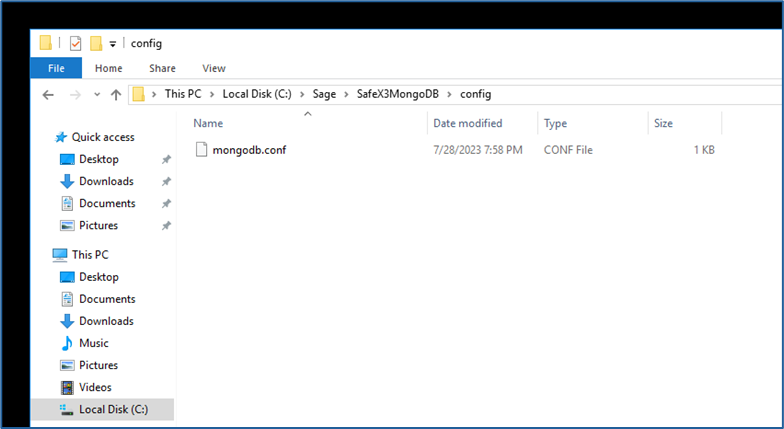
  1. Locate the file named “mongodb.conf” with your X3 instance’s MongoDB installation folder. It will be located in a subfolder named “config” 
    1. Example: Sage\MongoDBComponent\config 
    2. Different releases of the MongoDB component over the years have had different default naming conventions for the component folder. “MongoDBComponent” is the current standard and has been used consistently for the last several years and is the most common variant. If your X3 instance is older, your MongoDB folder may be named something like “MongoDB” or “SafeX3MongoDB” but it should still have a subfolder named “config” and a file named “mongodb.conf”.
      Mognobleed 1
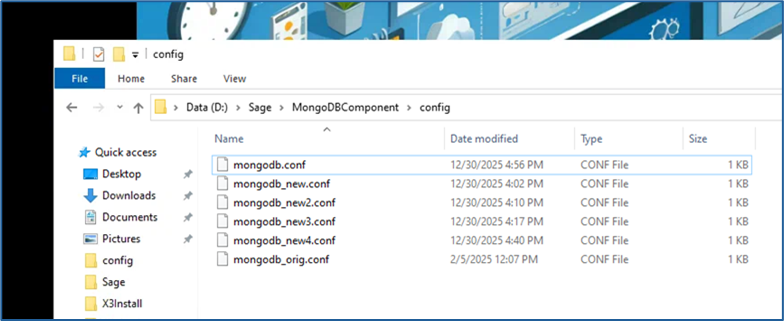
  2.  Copy the file, naming the copy something like “mongodb_original.conf” to save as a backup in case you need to revert to the unmodified version
    Mognobleed 2

    1.  It is imperative that this backup be made before any alterations to the file take place. Any issue with the syntax and layout of the config file will cause MongoDB to not restart successfully. If you are unable to restart the MongoDB service and no solution to the issue can be found, rename this backup as “mongodb.conf” to bring the MongoDB service back online. 
  3. A successful update of this file will require an advanced text editor such as Notepad++. Sage and Net At Work recommend Notepad++ for its wide-ranging utility and typically install it on every X3 server as part of a standard deployment. If you do not have it installed on your MongoDB server, it can be downloaded for free from the publisher here. 
    1. Any other text editor that can display space, tab, and end of line symbols can be used instead if that is preferred, though the rest of these instructions assume use of Notepad++. It is NOT recommended to use standard Microsoft Notepad for this change, as it lacks functionality to validate space and tab formatting. 
  4. Open the “mongodb.conf” file in Notepad++ 
    1. It should look similar to this, with file paths and folder names specific to your instance:
      Mognobleed 3
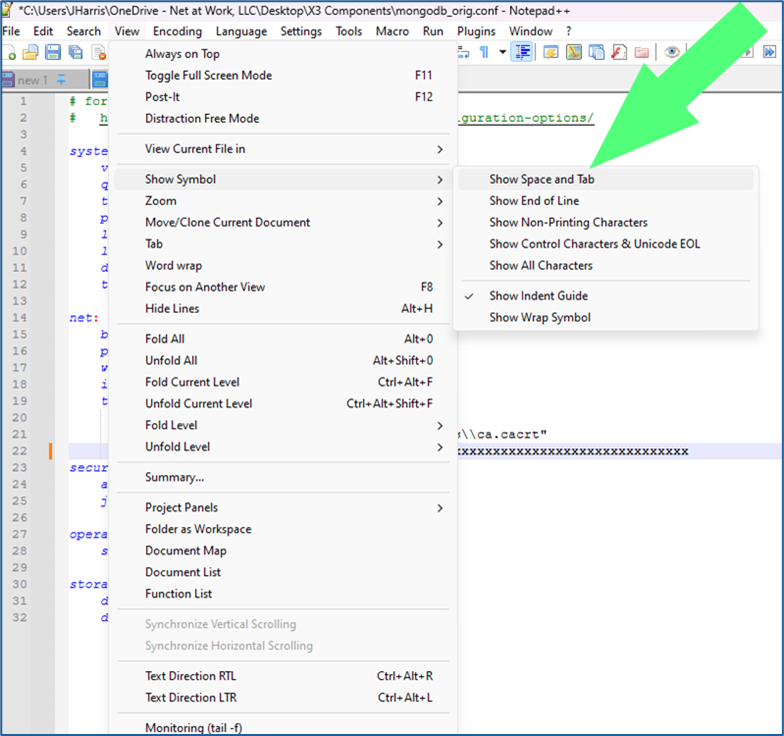
  5.  On the upper tool bar, select View – Show Symbol – Show Space and Tab and View – Show Symbol – Show End of Line
    Mognobleed 4
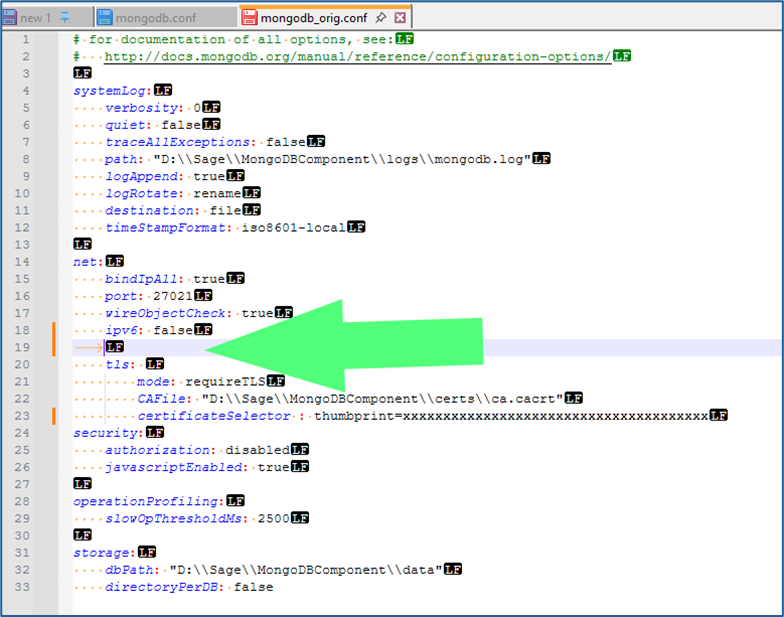
  6.  Once these two views have been selected, your file should appear like the following:
    Mognobleed 5

    1.  You should see yellow dots denoting spaces, and the “LF” symbol at the end of each line 
      1. Some older versions of Notepad++ only allow you to select one additional symbol view or the other. If your version only allows this, download and install the latest version of Notepad++ and use it. Both character views need to be seen simultaneously 
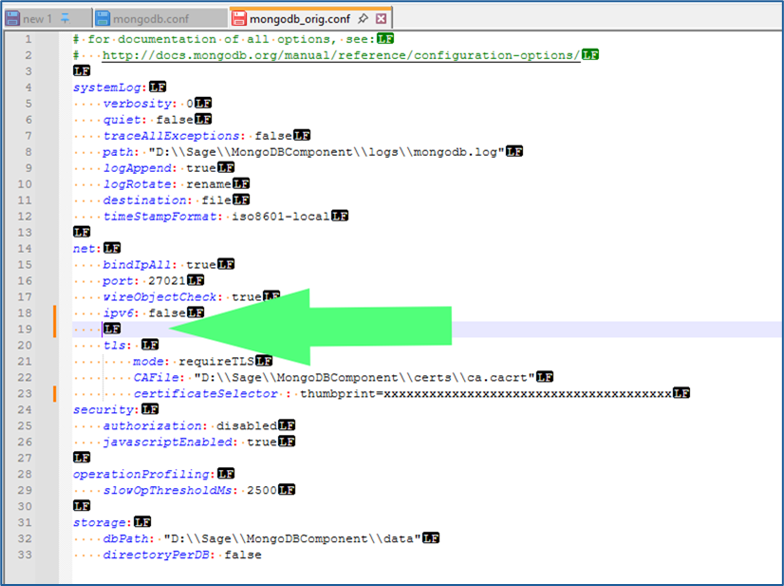
  7. Within the section of the file headed as “net:” and below the line containing “ipv6: false” and above the line containing “tls:” add an additional line.
    Mognobleed 6
     

    1.  NOTE: The new line has been added with a TAB rather than spaces. That’s what the yellow arrow symbol in the screenshot above indicates. The tab now needs to be removed, and spaces added in its place:
      Mognobleed 7
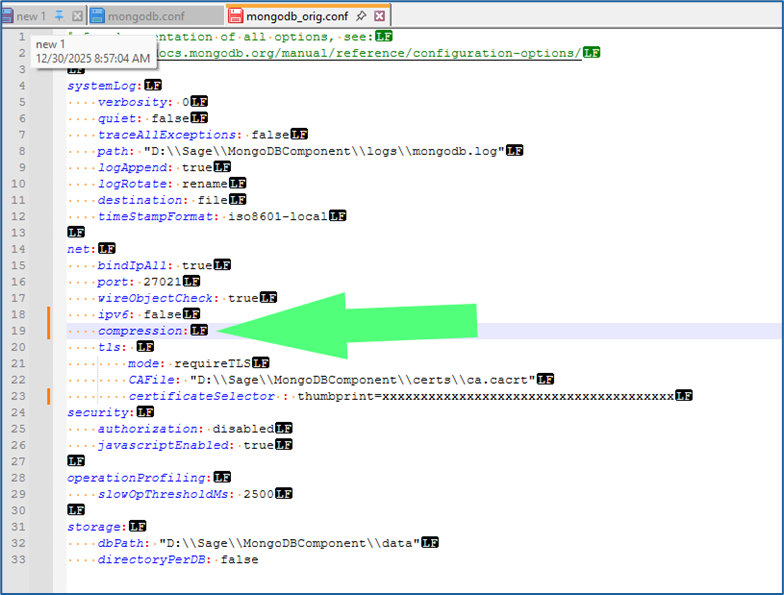
  8.  Add the following on this line, without the quotation marks, but with the colon: 
    1. “Compression:”  
      1. The beginning of this entry should align precisely with the lines above and below it:
        Mognobleed 8
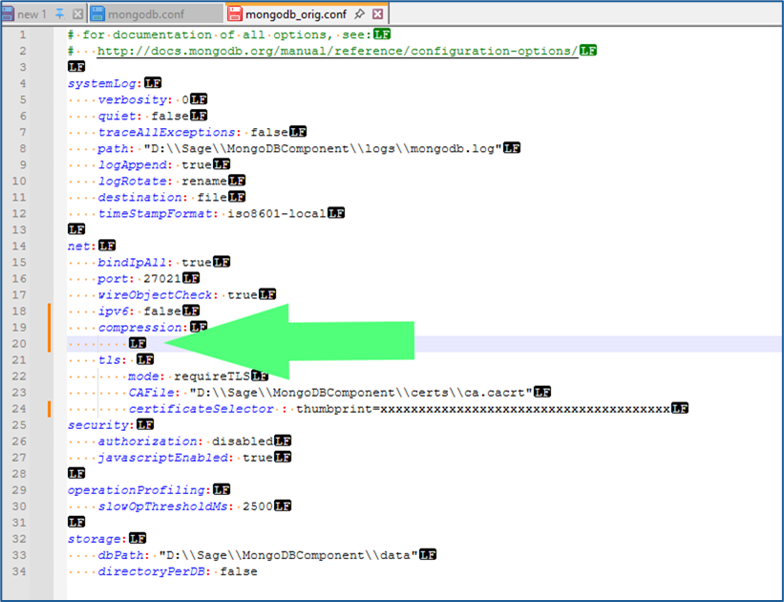
  9.  Add another line below “compression:” and above “tls:” 
    1. Repeat step 7 to remove the tab character and replace with spaces. This line should contain additional spaces so that it aligns with the lines below “tls:” such as “mode:” and “CAFile:”
      Mognobleed 9
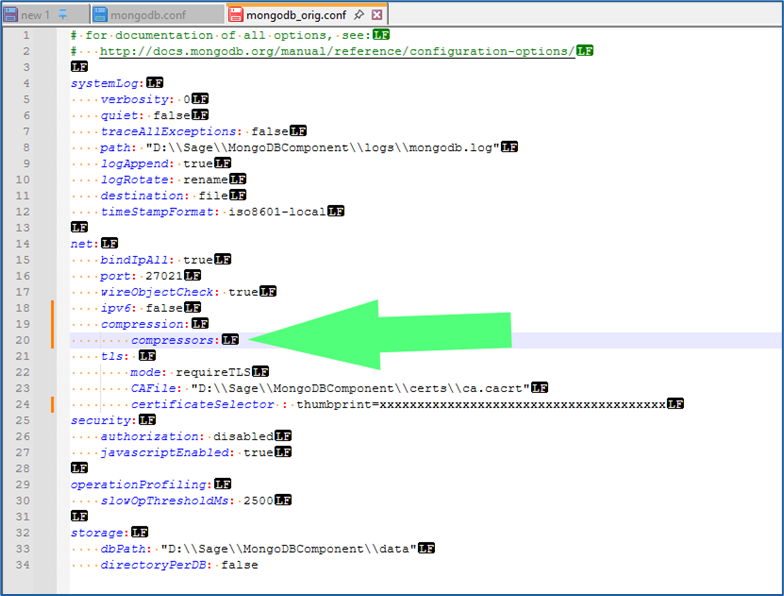
  10.   Add the following text, without the quotation marks but including the colon 
    1. “Compressors:”
      Mognobleed 10
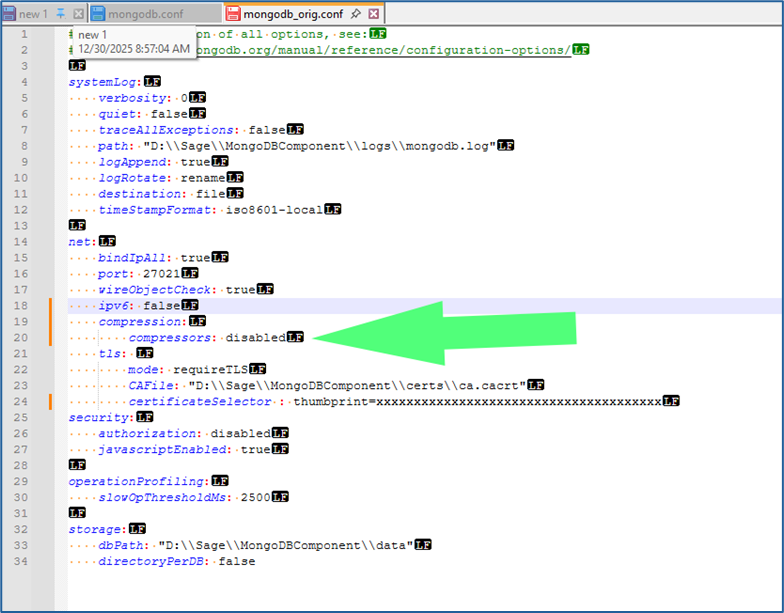
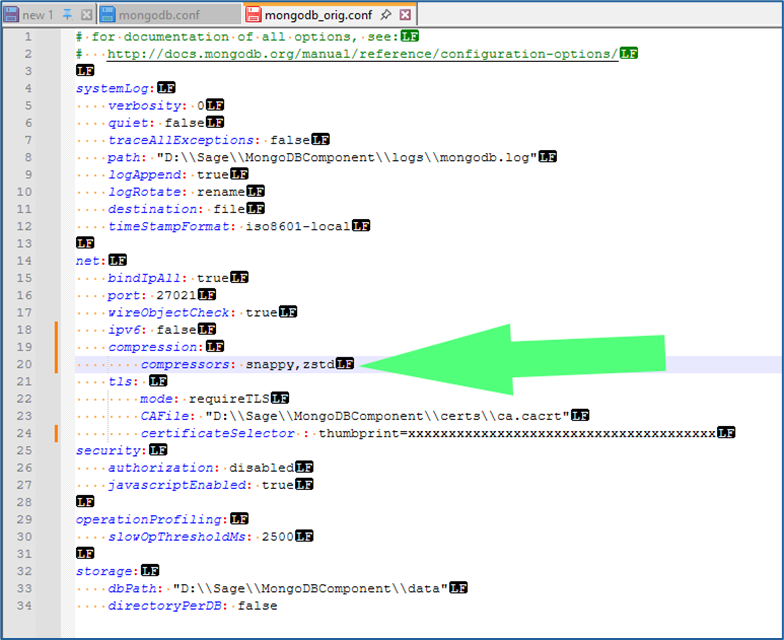
  11. Add the following text, depending on preference and situation, following “compressors:” and a single space (without quotation marks) 
    1. “Disabled” 
      1. Use this to disable all compression by MongoDB. This is Sage’s suggestion for all instances, and Net At Work’s recommendation if your MongoDB instance is on the same server as your Syracuse webhost component, and no other Syracuse webhosts are part of the solutionMognobleed 11
         
      2. “snappy,zstd” 
        1. Use this to allow MongoDB to continue to use the Snappy and ZSTD compression methods, while disabling the ZLIB compression method, which is the one affected by the security vulnerability 
        2. This allows MongoDB to continue using data compression, which it typically uses when communicating across the local network to remote Syracuse instances. Use this method if you wish to continue allowing MongoDB to use compression methods unaffected by the announced vulnerability 
      3. “snappy” 
        1. Some older versions of MongoDB and X3, such as X3 V11, do not include the ZSTD compression method and can only use the Snappy method. Use this and omit the “,zstd” if you are on X3 V11 or older and wish to continue to use data compression in MongoDB
          Mognobleed 12
  12.   Verify that the correct spacing, alignment, and line returns are in place so that it matches the example screenshots exactly. Misaligned spacing, incorrect positioning, or the presence of tabs instead of spaces will prevent MongoDB from running 
  13. Save the updated file 
    1. Note that the updated configuration will only go into effect once the MongoDB service has been restarted. It does not go into effect immediately. 

Part 2: Shutdown of X3 and Components

  1. The following procedure is for how to perform a clean shutdown of X3. This should be done prior to restarting MongoDB to pick up the modifications to the config file to mitigate the vulnerability. If you are already familiar with this process, you can skip to section three. 
  2. Log into X3 and access your Production folder. 
  3. Use the compass icon above to get to the X3 Menu 
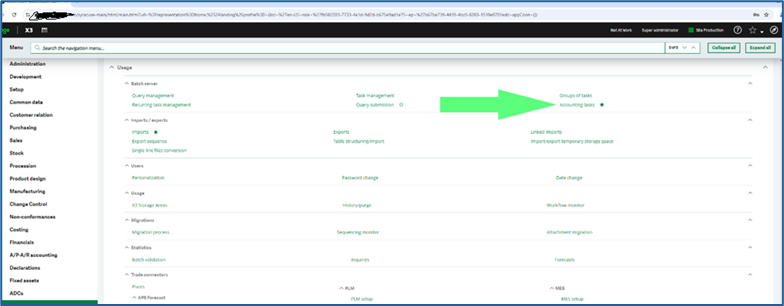
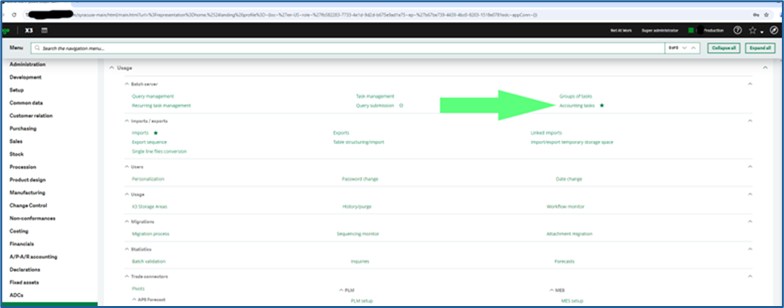
  4. Navigate to Usage>Batch Server > Accounting tasks
    Mognobleed 13
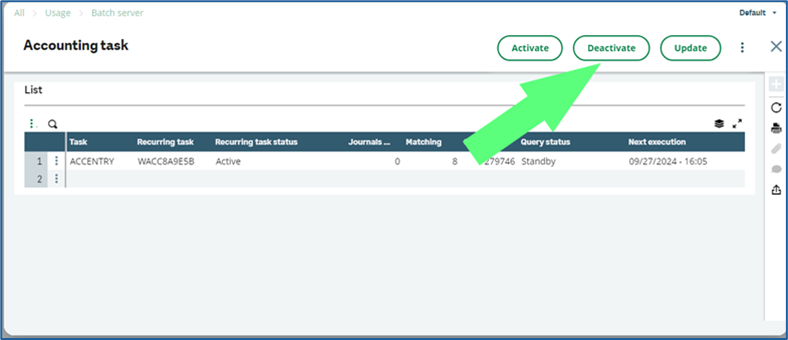
  5. Click the Deactivate button
    Mognobleed 14
     

    1.  Use “X”  the  button to back out of the Accounting task screen 
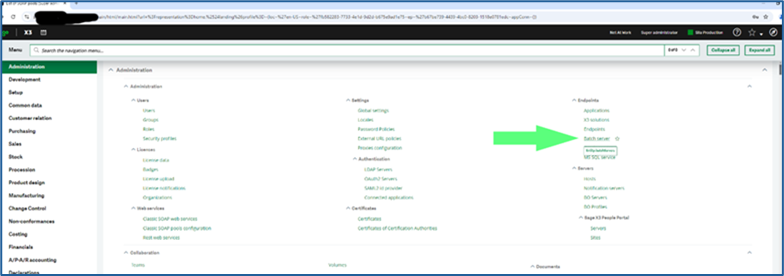
  6. Navigate to Administration > Endpoints > Batch server
    Mognobleed 15
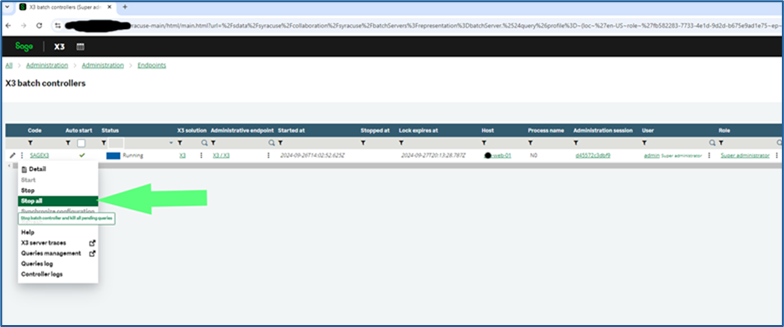
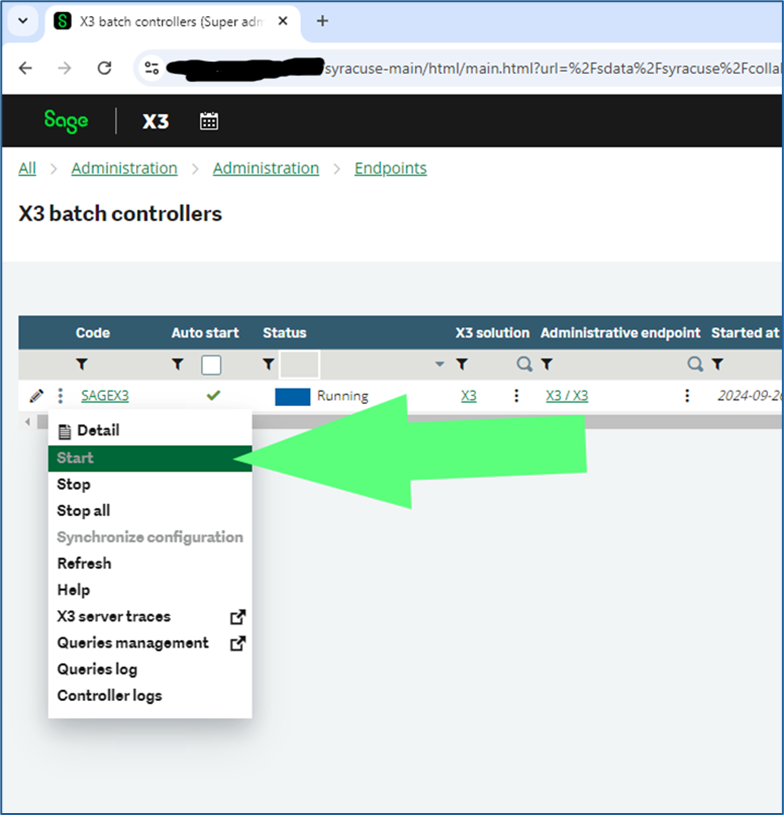
  7.  Click on the 3 vertical dots and select “Stop All” to stop the batch server
    Mognobleed 16
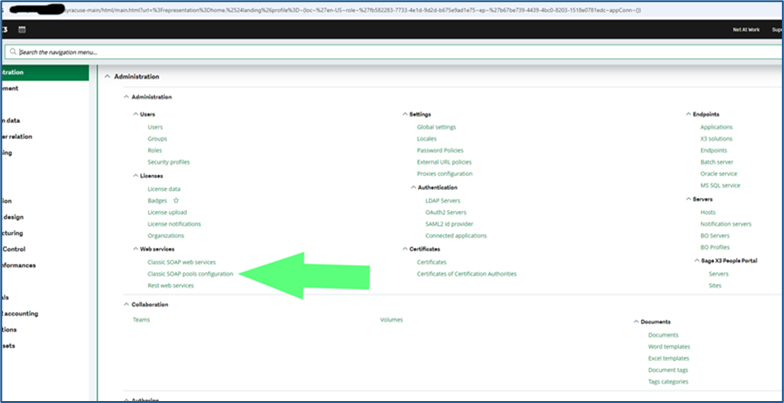
  8.  Stop WEB Pool Services
    Mognobleed 17
     

    1.  X3 -> Administration -> Administration -> Web services -> Classic SOAP pools Configuration 
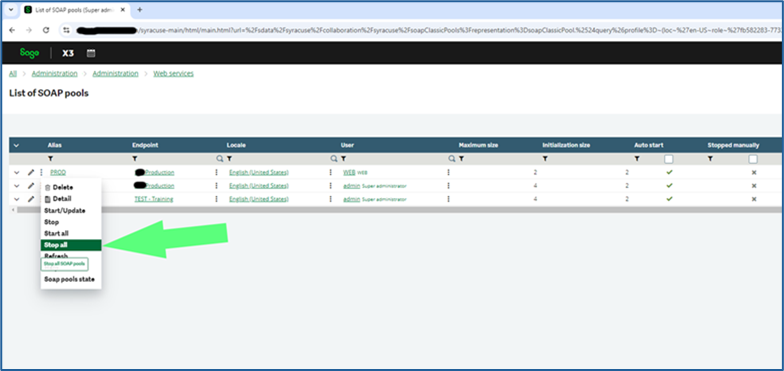
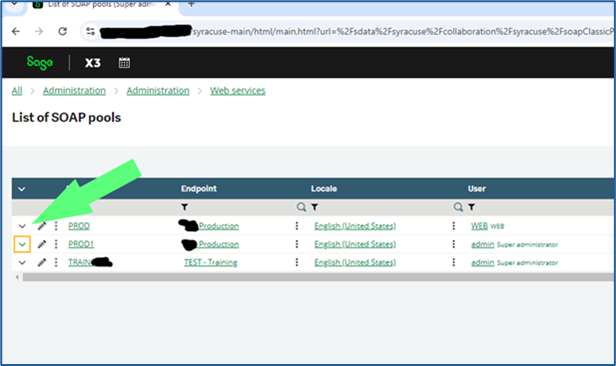
    2. Select the triple dots on each of the listed pools that have the \/ icon (indicating that they are running) next to Alias and click StopMognobleed 18
       

      1.  Click the Trashcan icon on each of the notification windows once each has confirmed stopped to clear the message from your screen. 
  9. Connect to the Windows desktop of your Syracuse server (or servers) 
  10. Open Services.msc 
  11. Stop the Syracuse service 
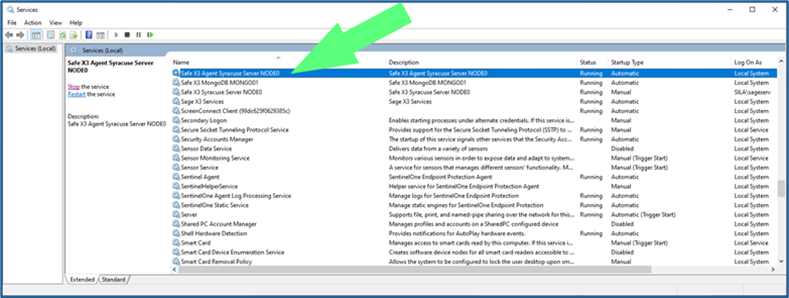
    1. For versions of X3 prior to V12 P36, there are two services, one named “Safe X3 Agent Syracuse Server NODEx” and one named “Safe X3 Syracuse Server NODEx” 
      1. The “x” in the names above represent a number, usually 0 but sometimes 1, 2, 3, 4, etc.
        Mognobleed 19
    2.  Stop the service named “Safe X3 Agent Syracuse Server NODEx” 
    3. This service controls the “Safe X3 Syracuse Server NODEx” service as well – stopping the Agent service will also stop the NODEx service. 
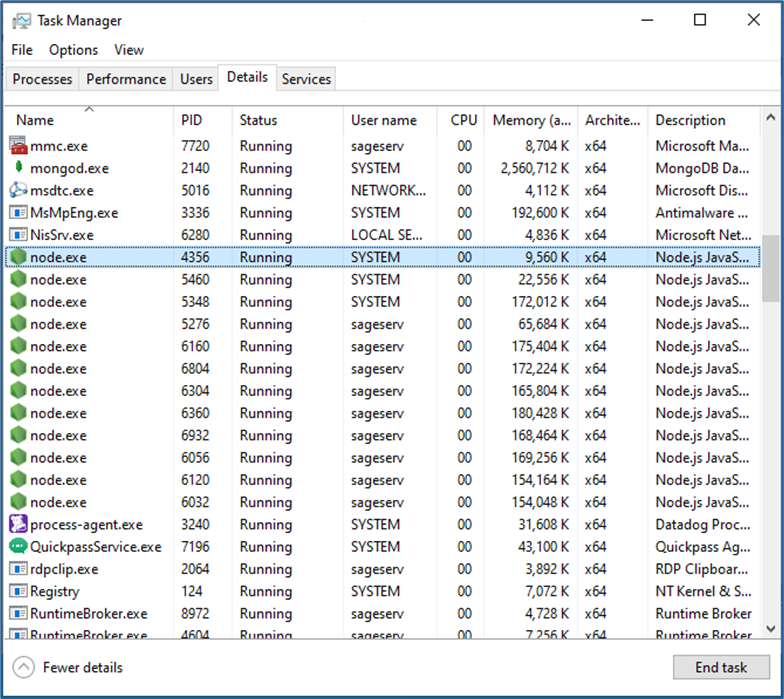
    4. If this service hangs up during the stop procedure, open Task Manager, go to the Details tab, select each instance of the “node.exe” process, and click End Task
      Mognobleed 20

      1.  ONLY perform step 2 above if the two Syracuse services do not successfully stop on their own 
    5. For versions of X3 after V12 P36, there is only one service named “Safe X3 Syracuse Server NODEx” 
      1. The same procedure as above can be performed while stopping only this service 
  12. If you have multiple Syracuse host instances in your X3 solution, repeat step 23 on all servers prior to proceeding with shutdown of MongoDB 
    1. If you also have a “Sage X3 Services” instance, stop this as well before proceeding 

Part 3: Stop and Restart of MongoDB Service

  1. Once all Syracuse and associated processes have been stopped on all servers, it is safe to restart MongoDB. 
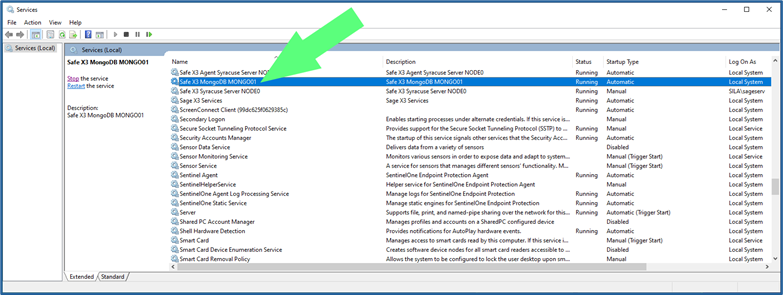
    1. Stop the service named “Safe X3 MongoDB MONGOxx”
      Mognobleed 21
  2.  Start the Safe X3 MongoDB MONGOxx service 
    1. If you get an error when attempting to restart this service, it is likely that there is a configuration, layout, or bad character in your revised “mongodb.conf” file 
    2. Re-verify the changes made in section I above 
    3. If you are still unable to restart MongoDB, change the name of your revised “mongodb.conf” to something like “mongodb_new1.conf” and rename the backup copy created in step 1 as “mongodb.conf” 
      1. This will rollback the config change made and will not mitigate the vulnerability, but it will make X3 functional again. 
  3. Once the Safe X3 MongoDB MONGOxx service is running again, you can restart all Syracuse services on all servers 
    1. Also restart Sage X3 Services if present after all Syracuse services have been restarted 
  4. Once Syracuse has restarted successfully, log back into X3. 
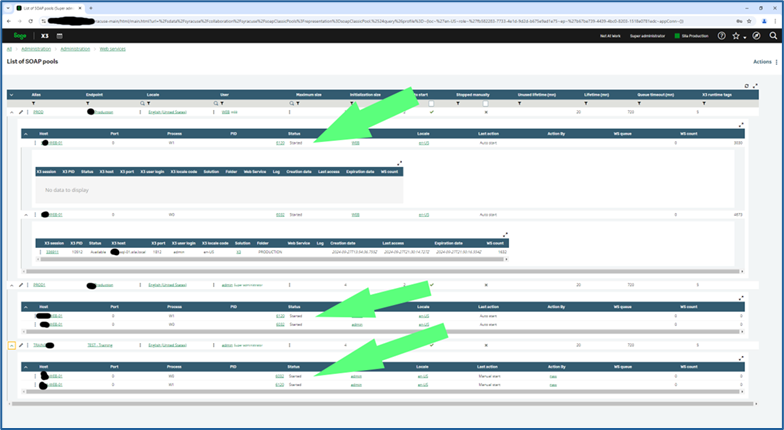
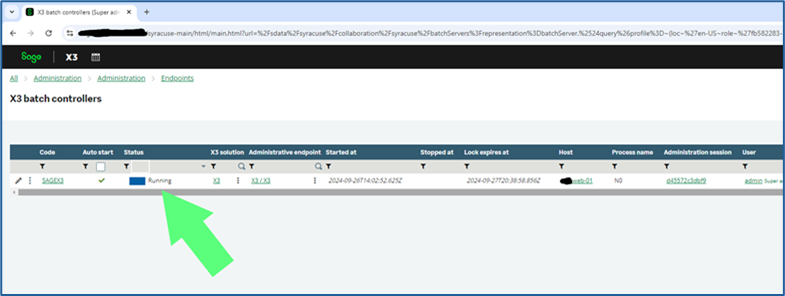
    1. Check that the batch server and all SOAP pools that are set on Auto Start have started running again. They are supposed to after a Syracuse restart. 
    2. If they did not, click the three dots as in section II above next to their names and click “Start”
      Mognobleed 25 Mognobleed 24 Mognobleed 23 Mognobleed 22
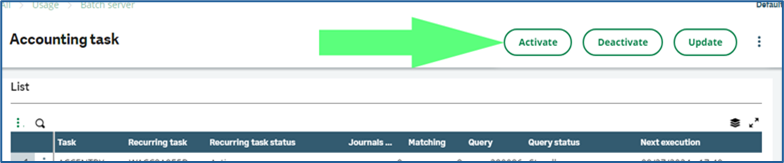
    3.  Go back into Usage > Batch Server > Accounting tasks  
    4. Click the Accounting task button
      Mognobleed 26
    5. Click the Activate button
      Mognobleed 27
    6.  Use “X” the  button to back out of the Accounting task screen 

Upon completion of these steps, your Sage X3 environment should be successfully mitigated against the MongoBleed vulnerability. If you encounter any issues, we recommend reviewing each step carefully to confirm configuration accuracy. Should you require assistance at any point, the Net at Work Sage X3 technical team is available to support you. 


Building for the Long Term: Creating More Value Together for MSP Partners

By Alex Solomon, Co-CEO, Net at Work

If you’re an MSP reading this and have seen the news around Net at Work, what matters most isn’t our growth, it’s how that growth translates into greater value, opportunity, and impact for our partners and their clients.

From the beginning, we built Net at Work around accountability. We made a deliberate decision to own both the infrastructure and application sides of the business so our clients and our partners wouldn’t be caught in the middle of fragmented solutions or finger-pointing. That same mindset continues to guide how we collaborate today. Whether you’re partnering with us to extend your capabilities or exploring deeper alignment, our shared goal is simple: help you deliver better outcomes for your clients without forcing you to change your core business.

Many MSPs excel at infrastructure, security, and ongoing operations. Increasingly, however, client needs are expanding beyond those areas. Applications, ERP, data, process optimization, and now AI-driven transformation—are becoming essential to driving real business value. Our role is to help partners bring those capabilities to market in a way that is practical, scalable, and aligned to client outcomes.

We are investing heavily in AI and emerging technologies, not as standalone solutions, but as tools to solve real business problems, improving efficiency, enabling better decision-making, and unlocking new growth opportunities for our clients. Just as importantly, we are committed to bringing our partners along on that journey—equipping you with the expertise, frameworks, and resources needed to confidently introduce these innovations to your customers.

Culture remains central to how we build our partner ecosystem. We are intentional about who we partner with because alignment matters. We look for MSPs who prioritize long-term relationships, trust, and delivering meaningful outcomes for their clients. That’s why many of our partners remain independent while leveraging our expanded capabilities—and why others, over time, choose deeper alignment as a natural next step.

Partnering with Net at Work means more than access to additional services. It means access to a broader bench of expertise, integrated solutions, and a shared commitment to end-to-end accountability. It also reduces execution risk by giving you a partner who can support the full client journey; from infrastructure through applications, data, and now AI-enabled transformation.

An end-to-end model, built for what’s next

For nearly 30 years, Net at Work has evolved alongside the SMB and midmarket landscape. Our growth has always been a reflection of changing client needs..

As those needs continue to evolve, particularly with the rise of AI and digital transformation, the importance of an integrated, accountable approach becomes even greater. Clients are no longer looking for point solutions, they are looking for partners who can help them connect technology to real business outcomes.

Investing in scale to better support our partners

Bringing in a private equity partner was not about changing our strategy, it was about accelerating our ability to execute on it. It allows us to invest ahead of demand, expand our capabilities, and support partners more effectively across a broader range of client needs.

For our partners, this means:

  • Access to deeper technical and functional expertise
  • Expanded capabilities across applications, data, and AI
  • The ability to confidently address more complex client challenges

The strategy hasn’t changed, our ability to support you has grown.

Scaling with purpose

As we scale, we are focused on maintaining what matters most: accountability, service quality, and a relentless focus on client success. Growth only matters if it enables better outcomes for our clients and for our partners.

There are few organizations operating at the intersection of infrastructure, applications, and emerging technologies at scale. That creates both opportunity and responsibility. We are committed to continuing to evolve thoughtfully, ensuring that as we grow, we remain a partner you can rely on to deliver.

Looking ahead—together

The challenges our clients face are becoming more complex, and the pace of change—especially with AI—is accelerating. No single organization can solve these challenges alone.

Our commitment is to continue building a partner ecosystem where MSPs can:

  • Expand their value to clients
  • Participate in new areas of growth like AI and transformation
  • Deliver stronger, more measurable business outcomes

Most importantly, we want to continue bringing the right partners along with us on this journey, ensuring that together, we are helping our clients not just keep up—but move forward with confidence.

That’s what this next chapter is about, it’s not just growth, but our shared success.

Why Traditional Managed IT Security Isn’t Enough Anymore, and What SMBs Should Do Instead
The primary reason businesses with fully managed IT still get breached: their agreement covers system management, not modern cybersecurity. Attackers exploit identities, credentials, and access permissions—the things that keep working even as they’re abused. Managed IT keeps systems running. Cybersecurity protects them from being compromised. Most small-to-medium sized business (SMB) contracts only fully cover the first. 

Key Takeaways 

  • Why managed IT and cybersecurity aren’t the same thing 
  • The structural gaps hidden in most managed services provider contracts 
  • What a modern, security-first managed services provider can deliver 
  • The questions to ask your provider this week 

The Managed Services Provider Assumption: “We’re Covered”

Equating IT support with security made sense when the main threats were viruses, hardware failures, and network outages. But that world is gone. Attackers now go after credentials, identities, and the relationships between systems and users, not the perimeter. 

As Brian Kingsley, Practice Director of IT Managed Services at Net at Work, puts it: “Security protection is a living thing and requires constant communication and adjustments as the landscape changes. If you bought a product and have not been involved since, that is almost a guarantee you have a problem.” 
The distinction matters: support keeps your systems running, but security protects them from being compromised. These are different disciplines, and assuming one covers the other creates dangerous blind spots. 
How Security Fails Even When IT Is “Working” 
Those blind spots become apparent when you examine what traditional IT metrics measure. Excellent help desk response times, 99.9% server uptime, and flawless nightly backups won’t prevent an attacker with valid credentials from accessing your most sensitive data. 

Today’s attacks follow predictable patterns that traditional IT support isn’t designed to catch: 

  • Stolen credentials from phishing or dark web purchases give attackers legitimate access, bypassing perimeter defenses entirely. 
  • MFA bypass through social engineering and technical exploits defeats the protection many consider their strongest defense. 
  • Third-party access abuse turns trusted provider connections into attack vectors. 
  • Permissions sprawl builds up over time—an intern who got admin access two years ago, a contractor whose login never got revoked, a finance app no one remembers approving—creating unmonitored pathways to sensitive data.  

Consider what happened to Clorox in August 2023. As reported by Cybersecurity Dive, hackers breached the company through a social-engineering attack that targeted their IT help desk. The breach crippled their ability to ship products for months.  
Clorox has since filed a $380 million lawsuit against the firm that managed their help desk, alleging credentials were handed to attackers without proper authentication. Tickets were being resolved the whole time. Their IT was “working.” Their security wasn’t. 
Why Traditional Managed Services Provider Models Leave Security Gaps
The Clorox breach illustrates a broader pattern. Traditional managed services provider models have structural gaps that leave clients exposed, even when service levels are being met. 

The result is that SMBs end up paying for managed IT and assuming security comes with it, when in practice, the agreement covers system management while the work of defending against modern attacks goes unowned. The gap is in the assumption that the correct tools are being run. 
Here’s what SMBs typically assume their managed services provider is handling but isn’t: 

  • Reactive ticketing instead of continuous oversight. Problems are addressed after they’re reported, not proactively detected. 
  • No clear ownership of security tools. Tools get deployed without anyone responsible for monitoring alerts, tuning configurations, or responding to incidents. 
  • No identity visibility. Organizations are blind to who is accessing what resources and whether that access is appropriate. 
  • No defined incident responsibility. When something goes wrong, valuable time is lost determining who responds. 

Another structural problem is how traditional models separate support and security.  

[pullout quote] “The traditional model splits support and security into two distinct products,” Kingsley notes. “When a client gets a support agreement, they are often without basic protection unless they then sign up for another agreement they’re not always aware of. It lets the managed services provider compete on price, but the client often doesn’t know what they need and doesn’t have it.” 

What SMBs Should Expect Instead 

Recognizing these gaps is the first step. The next is knowing what a modern managed IT partnership should deliver to strengthen your security posture and give you confidence in what’s being done: 

  • Clear security ownership. Someone is explicitly responsible for your security posture, not just your uptime. 
  • Identity-first visibility. You can see who is accessing your systems, from where, and whether their behavior patterns are normal. 
  • Always-on monitoring. Threats are detected as they emerge, not after damage is done. 
  • Measurable maturity. Benchmarks let you track improvement over time. 

“Executives and businesses need to keep in mind that a security solution will work, until it doesn’t,” Kingsley emphasizes. “And once it doesn’t, your business will suffer the consequences.” 

The framework that delivers these capabilities is Zero Trust, an approach that assumes nothing inside or outside the network should be automatically trusted. Every access request must be verified, every identity must be validated, and every activity must be monitored. 

What a Security-First Managed Services Provider Looks Like

Adopting Zero Trust changes how you evaluate IT partnerships. Zero Trust serves as a lens for decision-making, providing clear criteria for evaluating changes: does this increase or decrease our attack surface? Does it improve or degrade our visibility? These questions cut through vendor marketing to focus on security outcomes. 

Zero Trust also bridges the traditional gap between IT operations and security, integrating them around one goal: ensuring that the right people have the right access to the right resources at the right time, and nothing more. Whether you’re adding new employees, applications, or locations, the same principles apply.  

Learn more about how Net at Work implements Zero Trust through its Managed IT and Cybersecurity Services

Putting these principles into practice requires a managed services provider built for modern threats. Net at Work is an example of this model because security is integrated into core service delivery rather than treated as an optional add-on. That means unified managed IT and security agreements, identity-driven service design, governance, and execution working together, and maturity benchmarking against recognized frameworks like NIST and CISA. 

Questions SMB Leaders Should Ask Their IT Partner

Whether you’re evaluating a new provider or your current one, the right questions can reveal whether your IT partner is protecting your organization or simply keeping the lights on. 

  1. “Who owns identity risk in our environment?”If the answer is unclear or defaults to “that’s your responsibility,” you have a gap. Someone should be actively managing identity lifecycle, access permissions, and credential security.
  2. “How would we detect misuse of valid credentials?”Traditional security tools focus on blocking unauthorized access. But what happens when an attacker logs in with stolen but legitimate credentials? Your provider should have an answer.
  3. “Are we security-mature or just operationally stable?”Uptime and ticket resolution metricsdon’t measure security. Ask how your security posture is assessed and whether it’s improving. 
  4. “What happens in the first hour of a real incident?”The answer reveals whether incident response is planned or improvised. Look for specific roles, responsibilities, and communication protocols.

And if you ask whether a product will prevent ransomware, pay close attention to the response. “If someone answers ‘yes’ to that question, then that is a major red flag because they are guaranteeing something that is impossible,” Kingsley notes. “The security landscape is constantly changing, and it’s important to realize security is a layered, multi-faceted approach.” 

Key Takeaways: Five Actions You Can Take Now

  1. Audit your current security agreements.Pull out every contract you have with IT vendors and service providers.Identify exactly what security protections are included in your base agreements versus what’s treated as optional add-ons.  
  2. Ask your providers the evolution question:“How does your approach adapt as the threat landscape changes?” Listen carefully to the answer. If it centers on buyingadditional products or upgrading to premium tiers, that’s a warning sign. If it describes ongoing assessment, continuous improvement, and framework-based security, you’re likely in better hands.  
  3. Test what’s actually being done, not just what’s in the contract.Ask your provider for specifics: who reviews identity activity, how often, and what triggers a response? Who would call you in the first hour of an incident, and what is their name? If the answers are vague or generic, the work you assumed was happeningprobably isn’t. 
  4. Request a Zero Trust readiness assessment.An IT maturity or Zero Trust readiness assessment can give you a clear picture of your current risk profile,identify priority gaps, and provide a framework for improvement, without the pressure of a major engagement. Many providers, including Net at Work, offer these assessments for organizations evaluating their security posture. 
  5. Use your cyber insurance requirements as a coverage test.Insurers havetightened what they require over the past two years, which makes their checklists a useful third-party audit of what you have. Anything the insurer requires that your managed services provider isn’t demonstrably doing is a gap between what you assumed was covered and what is. 

Want to find out what your current managed services agreement covers? Contact Net at Work for a Zero Trust readiness assessment—a no-pressure review to strengthen what you have, close the gaps, and give you confidence in what your agreement covers.

A MasterClass in Digital Transformation Strategy: Overcoming Digital Roadblocks

In today’s rapidly evolving digital landscape, organizations face numerous challenges and opportunities. How do you navigate these complexities to ensure you not only survive but thrive? Join us for an enlightening live web event titled “Transform and Thrive: Overcoming Digital Roadblocks in Your Business.”

Navigating Common Digital Transformation Challenges & Implementing Effective Strategies

We are excited to feature Eric Sluss, a seasoned Chief Information Officer from Net at Work’s Fractional CIO & Advisory group. Eric will share his expertise on how to tackle the human capital, process, and technology challenges that often hinder digital transformation. His insights are designed to help you drive meaningful change and foster innovation within your organization.

Whether you’re at the beginning of your digital journey or looking to fine-tune existing processes, this on-demand webinar promises to equip you with the essential knowledge and tools for a successful transformation.

During this recorded webinar, you’ll discover:

  • The key components of digital transformation: Understand the foundational elements that drive successful digital initiatives.
  • Common challenges encountered along the way: Learn about typical obstacles and how to overcome them.
  • Best practices for ensuring success: Gain actionable strategies to ensure your digital transformation efforts are effective and sustainable.

Watch on-demand webinar for this opportunity to turn challenges into opportunities and propel your business towards unparalleled success. Join us and transform your digital future!

Cybersecurity in Healthcare ERP: Strategies for Protecting Patient Data

If a cyberattack shuts down your healthcare ERP system for days, can your patients still receive the care they need?

Healthcare organizations face a growing cybersecurity crisis, with the American Hospital Association reporting that the healthcare field experienced more cyberthreats in 2024 than any other critical infrastructure industry, and related research found that, as of early 2025, 92% of healthcare organizations experienced at least one cyberattack in the past 12 months. Additionally, McKinsey & Company reports that healthcare provider organizations incur the highest cost for data breaches of any industry, averaging $9.8 million per incident, which is more than 1.5 times the financial services industry’s average cost of $6.1 million.

Beyond financial losses, cyberattacks directly threaten patient care and organizational survival. For small-to-medium-sized healthcare practices and senior living centers, this reality demands immediate attention to how enterprise resource planning (ERP) systems handle patient data protection.

The Current Threat Landscape

Rising Attack Frequency and Sophistication

Cyberattacks targeting the healthcare sector have continued to intensify, with hundreds of healthcare cyberattacks reported thus far in 2024. These aren’t simple data theft attempts; they’re sophisticated operations designed to maximize disruption to patient care.

The most significant cyberattack in U.S. healthcare history occurred when ransomware hit Change Healthcare, impacting every hospital in the country and exposing the health data of 190 million people. This incident highlighted how interconnected healthcare systems create cascading vulnerabilities that can paralyze entire care networks.

ERP Systems as Prime Targets

Healthcare ERP systems are particularly attractive to cybercriminals because they:

  • Centralize vast amounts of protected health information (PHI)
  • Control critical business functions including billing, scheduling, and supply chain management
  • Often integrate with multiple third-party vendors and systems

More than four out of five physicians have been victims of some type of cyberattack, with “phishing” being the most common (55%). These attacks frequently target ERP login credentials to gain system-wide access.

The Critical Role of ERP Selection in Cybersecurity

Cloud-Native vs. Legacy Systems

The choice between modern cloud-based ERP systems and legacy on-premise solutions directly impacts cybersecurity posture. According to a 2021 survey, 73% of the healthcare industry uses legacy technology, leading to manual reporting processes that are time-consuming and prone to human error.

Modern cloud ERP systems can offer several security advantages:

>Built-in Security Architecture: Cloud-native systems are designed with security as a foundational element, not an afterthought. They include encryption, multi-factor authentication, and automated security updates as standard features.

Compliance by Design: Healthcare ERP software like Sage Intacct helps healthcare organizations maintain HIPAA compliance through advanced security controls and audit trails.

Vendor Security Expertise: Cloud ERP providers invest significantly more in cybersecurity expertise than individual healthcare organizations can afford internally.

“Beyond financial losses, cyberattacks directly threaten patient care and organizational survival.”

Integration and Third-Party Risk Management

Third-party breaches remain top concerns for 2025, with supply chain attacks becoming increasingly common. ERP systems must be evaluated not only for their internal security but also for how they manage integrations with:

  • Electronic Health Records (EHR) systems
  • >Medical devices and IoT endpoints
  • Payment processing platforms
  • Business intelligence tools
  • Vendor management systems

Essential Cybersecurity Strategies for Healthcare ERP

1. Comprehensive Risk Assessment

Before selecting or upgrading an ERP system, healthcare organizations must conduct thorough risk assessments that include:

  • Asset Inventory: Maintaining comprehensive and continuously up-to-date visibility across the whole organization is the first step in healthcare cybersecurity.
  • Data Flow Mapping: Understanding how PHI moves through the ERP system and its integrations
  • Vendor Security Evaluation: Assessing third-party providers’ cybersecurity practices and compliance certifications

2. Zero Trust Architecture Implementation

Organizations must adopt a zero-trust approach that treats all access requests as potentially malicious, regardless of source. For healthcare ERP systems, this means:

  • Network segmentation to isolate ERP systems from other network traffic
  • Multi-factor authentication for all system access
  • Role-based access controls with principle of least privilege
  • Continuous monitoring and verification of user activities

3. Advanced Threat Detection and Response

AI-driven threats are becoming increasingly sophisticated, requiring equally advanced defense mechanisms. Healthcare organizations need ERP systems that incorporate:

  • Real-time threat detection powered by artificial intelligence
  • Automated incident response capabilities
  • Behavioral analytics to identify unusual user patterns
  • Integration with security information and event management (SIEM) systems

4. Regular Security Assessments and Updates

The HITECH safe harbor requires healthcare organizations to adopt “recognized cybersecurity practices” to qualify for reduced penalties in case of breaches. This includes:

  • Regular vulnerability assessments and penetration testing
  • Automated security patching and updates
  • Compliance monitoring and reporting
  • Business continuity and disaster recovery planning

The Value of Expert Technology Advisory

Why Healthcare Organizations Need Specialized Guidance

Gartner predicted that by the end of 2025, lack of talent or human failure will be responsible for over half of significant cyber incidents. Small-to-medium-sized healthcare organizations face particular challenges:

  • Limited internal IT security expertise
  • Budget constraints for cybersecurity investments
  • Complexity of healthcare compliance requirements
  • Rapidly evolving threat landscape

The Technology Advisor Advantage

Working with experienced technology advisors provides several critical benefits:

Industry Expertise: Advisors specializing in healthcare understand the unique regulatory requirements and operational challenges facing medical practices and senior living centers.

Vendor Agnostic Approach: The best advisors maintain an agnostic approach, recommending solutions based on organizational needs rather than vendor relationships.

Holistic Security Strategy: Rather than focusing solely on ERP selection, experienced advisors help organizations develop comprehensive cybersecurity strategies that address people, processes, and technology.

Ongoing Support: Dedicated support teams ensure that organizations maximize their software investment, benefiting from continuous updates and expert guidance tailored to their needs.

Regulatory Compliance and Future-Proofing

Evolving Compliance Requirements

Several bipartisan bills have been introduced to strengthen cybersecurity requirements in the healthcare sector, including the Health Infrastructure Security and Accountability Act of 2024. Healthcare organizations must ensure their ERP systems can adapt to evolving regulatory requirements.

Key compliance considerations include:

Building Cyber Resilience 
Technology failures and cyber outages can disrupt operations for extended periods, with one in three physicians reporting their practice experienced a cyberattack-related business shutdown. Resilient ERP systems must include:

  • Redundant data centers and backup systems
  • Real-time data replication and recovery capabilities
  • Business continuity planning and testing
  • Staff training and incident response procedures

Key Takeaways for Healthcare Leaders

  1. Cybersecurity is a Patient Safety Issue: In 2023, >71% of healthcare organizations surveyed who had suffered cyberattacks reported poor patient outcomes because of delays in procedures and tests following the attacks.
  2. ERP Selection Directly Impacts Security Posture: Modern cloud-based ERP systems offer significantly better security capabilities than legacy on-premise solutions, with built-in compliance features and professional security management.
  3. Integration Security is Critical: Third-party breaches remain a top concern for 2025. ERP systems must be evaluated for their ability to securely manage integrations with other healthcare technologies.
  4. Expert Guidance is Essential: The complexity of healthcare cybersecurity requires specialized expertise that most SMB organizations cannot maintain internally. Working with experienced technology advisors ensures proper ERP selection and implementation.
  5. Proactive Approach Reduces Risk: A survey of physicians by the American Medical Associationfound that 85% believe it is crucial to share electronic data outside of their health system for quality care but want to do it safely. Proactive cybersecurity measures enable secure data sharing while protecting patient privacy.
  6. Compliance Benefits Healthcare Practices: Organizations that adopt recognized cybersecurity practices may qualify for reduced penalties under HITECH safe harbor provisions.

Securing Your Healthcare Organization’s Future

The cybersecurity landscape for healthcare organizations will only become more challenging. Selecting the right ERP system and working with experienced technology advisors can mean the difference between becoming another breach statistic and maintaining secure, efficient operations that protect both patient data and care quality.

The time for reactive cybersecurity approaches has passed. Healthcare organizations must take proactive steps now to implement comprehensive cybersecurity strategies centered around secure, modern ERP systems and expert guidance.

Ready to strengthen your healthcare practice’s cybersecurity posture?

Contact Net at Work today to discuss how our healthcare ERP expertise and comprehensive technology advisory services can help you protect patient data, ensure compliance, and build resilient operations for the future.

Adapting to the New Age of AI-Powered Cyber Threats

When you log in to your computer on a Monday morning and see that ransomware screen demanding payment, you should realize that the attack didn’t start that weekend. As Net at Work CISO Michael Powell explains, “To stage an attack, it’s not uncommon for a threat actor to have been in the environment up to 90 days.” 

For weeks or months, threat actors may have been cataloging your data and exfiltrating files. With U.S. ransomware attacks up 149% year-over-year as of early 2025, understanding how these attacks work has never been more critical. 

Most attacks follow predictable patterns. Once you understand the playbook, you can build defenses that work. 

In this article you will learn: 

  • Why even well-funded cybersecurity efforts struggle to keep pace with evolving threats 
  • How the “double extortion” ransomware model puts organizations at risk even with backups 
  • Why AI has made business email compromise nearly impossible to detect 
  • Simple defensive strategies that dramatically improve security posture 
  • How to evaluate readiness and find the right security partners 

Why This Keeps Happening 

“Why is it hard? Why are we still trying to solve this problem?” Powell asks. His answer: “We’re effectively in an arms race.” 

Organizations invest heavily and close vulnerabilities. Yet as one gap closes, attackers adapt. Cyber attacks per organization increased 47% in Q1 2025, reaching 1,925 weekly attacks on average. 

The real challenge is asymmetry. Powell explains, “There could be more people trying to attack your organization than you have to play defense.” 

The Ransomware Reality 

During the 30-90 day reconnaissance phase, attackers aren’t randomly grabbing files. “They pull a file listing and then based on the file names and the file structures, they go for the information that they think is pertinent,” Powell explains. They systematically identify personally identifiable information, financial records, and commercially sensitive data, then slowly exfiltrate copies. 

When attackers are ready to strike, timing matters. “We often see spikes around weekends, around evenings, around holidays.” Powell notes, “This is because reconnaissance and encryption take time.” They choose moments when you’re least likely to respond quickly. 

The Double Threat 

Even with robust backups, you face what Powell calls the “double extortion threat.” 

“Your data is encrypted, and you need to decrypt it to continue to do business,” he explains. “But the threat actor knows these days people put reasonable technology controls in place. They’re betting you have backups, so they add a second pressure point: pay up, or we leak everything.” 

The consequences go beyond embarrassment. Depending on your location and the data involved, you may face legal obligations to notify affected individuals. The average ransom demand in 2024 was $4.32 million, but legal costs and reputational damage can dwarf that figure. 

Nearly one in five small businesses that suffered a cyberattack filed for bankruptcy or closed. This isn’t an IT problem; it’s a serious business survival issue. 

How AI Changed Business Email Compromise 

While ransomware grabs headlines, business email compromise (BEC) operates quietly and is equally devastating. BEC was the second-costliest cybercrime in 2023, with nearly $3 billion in losses. 

AI has fundamentally transformed the threat. Attackers compromise an email account and download sent items. Previously, analyzing that information manually took time. Now? “You download that information, you throw it into AI, and then you can ask it questions,” Powell explains. 

The AI builds a complete profile and generates emails that perfectly mimic executives’ communication. “Where we used to be able to spot those emails with relative ease,” Powell says, “AI helps the threat actor be a lot more convincing with very little additional work.” 

With 73% of reported cyber incidents in 2024 being BEC attacks, and organizations with 1,000+ employees facing a 70% weekly probability of at least one BEC attack, this demands constant vigilance. 

Your People: Vulnerability and Solution 

“Most of the compromises we see occur because a person takes an action,” Powell says. “But they’re rarely doing it with malicious intent.” 

Most breaches happen because employees respond to what appears urgent. “Pretty much every phishing test I have ever been a part of, at least one person has clicked the email, and you only need one.” 

The solution lies in changing the culture around reporting threats rather than carrying out punishments. “People shouldn’t feel that if they raise a security threat, the IT team is going to pounce on them,” Powell emphasizes. 

“Every person is a sensor,” Powell explains. Train people to recognize what normal looks like, then empower them to speak up. Modern training uses gamification: You click something, and then there’s just-in-time training that shows you why that was good, or why that was bad.” 

Building Defenses That Work 

Effective defense requires layered approaches that create multiple “tripwires.” 

“The more visibility you have, the more chances you’ve got of spotting an anomaly,” Powell explains. Each layer, including endpoint detection, email security, patching, backups, network segmentation, increases the likelihood you’ll catch attacks before they succeed. 

But technology alone isn’t enough. Organizations need clear procedures. Powell shares an example of a company with excellent technology but no response plan: “Person A looks at person B, they don’t know who’s responsible. Can we turn the system off? We don’t know who approves that.” 

His advice: “If you don’t know who to inform in case of a breach, find out.” Conduct tabletop exercises revealing gaps. “Have people sit around a table and practice what they would do if a ransomware email came in.” 

Where to Start 

Powell offers a straightforward evaluation framework: 

  • Evaluate what you have. “There are so many times I’ve gone into an organization where they’re paying for something, but they’re using less than 10% of it.” Understand current capabilities before buying new solutions. 
  • Define risk tolerance. What’s acceptable downtime for different systems? Document thresholds in advance. 
  • Conduct regular audits. Most insurance carriers require annual assessments and often help with scanning. 
  • Leverage available expertise. Your insurance company often provides guidance. If working with technology providers, understand what expertise they have that they could bring to bear in the event of an incident. 
  • Consider cybersecurity as a service. For many businesses, working with a managed security service provider offers specialized skills without building an in-house team. “What they’re effectively doing is delivering the speed, delivering the skills and reducing the cost,” Powell explains. 

When evaluating providers, Powell emphasizes fit over features: “Look for the one that suits your business and your processes.” And be sure to verify responsiveness: “There’s nothing worse than receiving a ransomware attempt on a Friday night and then realizing that the partner says they’ll deal with it Monday morning.” 

And be sure to check references. “Try to find an organization they’ve worked with and talk to that organization. When you’re buying into cybersecurity as a service, you’re buying into trust.” 

Moving Forward with Confidence 

Understanding that attacks follow patterns, defenses can be layered effectively, and preparation dramatically improves outcomes will put you in a stronger position. With 86% of cyber incidents involving business disruption, the question isn’t whether to invest in security, but how to invest wisely. 

Take the Next Step 

Net at Work helps organizations build resilient security strategies that balance protection with practical business needs. 

For a limited time, we’re offering complimentary assessments: 

  • IT Infrastructure Assessment: Comprehensive evaluation identifying vulnerabilities and opportunities 
  • Email Security Assessment: In-depth analysis of your email security posture—the primary attack vector for both ransomware and BEC 

Don’t wait for a breach to discover where your defenses fall short. Contact Net at Work today to schedule your assessment and start building security that protects your business without compromising operations. 

Ready to strengthen your security? Contact Net at Work to claim your complimentary assessments and speak with experts who understand your challenges. 


Key Takeaways 

  • Understand the timeline: Ransomware attacks involve 30-90 days of reconnaissance before encryption. Early detection is everything. 
  • Prepare for double extortion: Even with backups, data leaks trigger legal obligations and reputational damage. 
  • Take AI seriously: BEC attacks now use AI to perfectly mimic writing styles, making traditional detection nearly impossible. 
  • Build culture, not just controls: Encourage reporting without punishment. Every employee is a sensor who can spot anomalies. 
  • Layer your defenses: Multiple security controls create “tripwires” that increase chances of catching attacks early. 
  • Rehearse your response: Tabletop exercises reveal gaps and build muscle memory for critical decisions. 
  • Leverage external expertise: Insurance carriers and managed security providers offer prohibitively expensive skills and resources. 

 Sources 

  1. TechTarget, “Ransomware trends, statistics and facts,” 2025. 
  2. Check Point Research, “Q1 2025 Global Cyber Attack Report,” May 2025. 
  3. Spacelift, “50+ Ransomware Statistics for 2025,” July 2025. 
  4. Fortinet, “Ransomware Statistics 2025,” 2025. 
  5. The SSL Store, “Business Email Compromise Statistics,” March 2024. 
  6. Hoxhunt, “Business Email Compromise Statistics 2025,” March 2025. 
  7. LastPass, “Protect against business email compromise in 2025,” May 2025. 
  8. Palo Alto Networks Unit 42, “Extortion and Ransomware Trends,” April 2025.